
EDI 810 Invoice Definition
An EDI 810 document is an electronic version of a paper invoice that complies with the ANSI X12 EDI specification. A supplier will send an EDI 810 invoice to the customer or trading partner in response to an EDI 850 (Purchase Order) as a request for payment of goods or services once they are shipped or provided.
Sent by: Supplier / Vendor / Manufacturer Received by: Buyer / Retailer / Distributor
Response documents: EDI 997 (Functional Acknowledgement) + EDI 820 (Payment Order / Remittance Advice)
What EDI 810 Represents in Real Life
The EDI 810 is not just a billing document.
It is the financial confirmation that closes the operational loop started by the purchase order.
When an EDI 810 is processed successfully:
-
- The customer’s system matches it against the PO and shipment
- Accounts payable can schedule payment automatically
- Discrepancies are flagged early instead of discovered weeks later
- Cash flow becomes predictable for both sides
In short, the EDI 810 turns shipped product into revenue.
EDI 810 Specification
This X12 Transaction Set contains the format and establishes the data contents of the Invoice Transaction Set (810) for use within the context of an Electronic Data Interchange (EDI) environment. The transaction set can be used to provide for customary and established business and industry practice relative to the billing for goods and services provided.
Source: Accredited Standards Committee X12. ASC X12 Standard [Table Data]. Data Interchange Standards Association, Inc., Falls Church, VA.https://x12.org/node/4354
Components of an EDI 810 Invoice include:
Each EDI 810 Invoice document contains segments and data elements. Each segment contains at least one data element. Each data element is a data field. Examples of data elements are:
- Invoice number and date
- Purchase order number
- Payment terms
- Item information, quantities and price along with UPC/EAN/GTIN,
- Shipping details
Additional data that may be included in the invoice pertains to:
- Carrier and service levels
- Invoice terms
- Ship to and remit to locations
- Vendor number
- Charges and/or allowances
- Taxes
- Buyer item number
- Vendor part number
- Address information
Related EDI Transactions
Other EDI documents that are similar to the invoice are:
- EDI 880 Grocery Products Invoice.
- EDI 894 Delivery/Return Base Records
Other related EDI documents include:
- EDI 997 Functional Acknowledgement
- EDI 856 Ship Notice/Manifest
- EDI 857 Shipment and Billing Notice
- EDI 864 Text Message
- EDI 820 Remittance Advice
- EDI 856 Advance Shipment Notice
- EDI 855 Purchase Order Acknowledgment
EDI 810 Invoice Sample File Format
ISA*00*          *00*          *12*111111111      *12*222222222      *230413*1608*U*00401*000000257*0*P*>~GS*IN*111111111*222222222*20230413*1608*257*X*004010~ST*810*0257~BIG*20230211*0598728*20230131*129367235~CUR*X6*USD~N1*RI*Test Place*92*104075~ITD*******07~IT1**1*EA*69.10~PID*F****
I is a vib~TDS*6910~CTT*1~SE*10*0257~GE*1*257~IEA*1*000000257~
What Each Line in EDI 810 Format Means
| Segment | What it does |
|---|---|
| ISA | Interchange header — identifies sender, receiver, date, and control number |
| GS | Group header — identifies the transaction type (IN = Invoice) |
| ST*810 | Marks the start of the 810 transaction set |
| BIG | Beginning segment for invoice — invoice number, invoice date, PO number, and PO date |
| CUR | Currency — specifies the transaction currency (e.g., USD) |
| REF | Reference numbers — vendor number, department number, or other buyer-assigned identifiers |
| N1 | Party identification — identifies bill-to (RI), remit-to, ship-to, and sold-to parties |
| N3 / N4 | Address lines — street address, city, state, ZIP, and country |
| ITD | Invoice payment terms — net days, discount percentage, and due date |
| IT1 | Line item detail — quantity invoiced, unit of measure, unit price, and item identifiers (UPC, SKU, GTIN) |
| PID | Product/item description — free-form or structured item description |
| SAC | Service, promotion, allowance, or charge — freight costs, early-pay discounts, and taxes |
| TDS | Total dollar summary — total invoice amount expressed in cents |
| CTT | Transaction totals — number of line items in the invoice |
| SE | Transaction set trailer — marks the end of the 810 and contains a segment count |
| GE | Group trailer — closes the functional group opened by the GS segment |
| IEA | Interchange trailer — closes the interchange envelope opened by the ISA segment |
What an EDI 810 Looks Like Inside Elevate
Although the raw EDI 810 is machine-readable, our cloud-based EDI platform Elevate presents the invoice in a clean, readable format for business users.
Inside Elevate, teams can see:
-
- Invoice number and date
- Related PO number
- Line items, quantities, and pricing
- Freight, taxes, allowances, or discounts
- Remit-to and bill-to details
- Status of delivery and processing
This visibility helps accounting, operations, and support teams troubleshoot issues quickly without reading raw EDI.
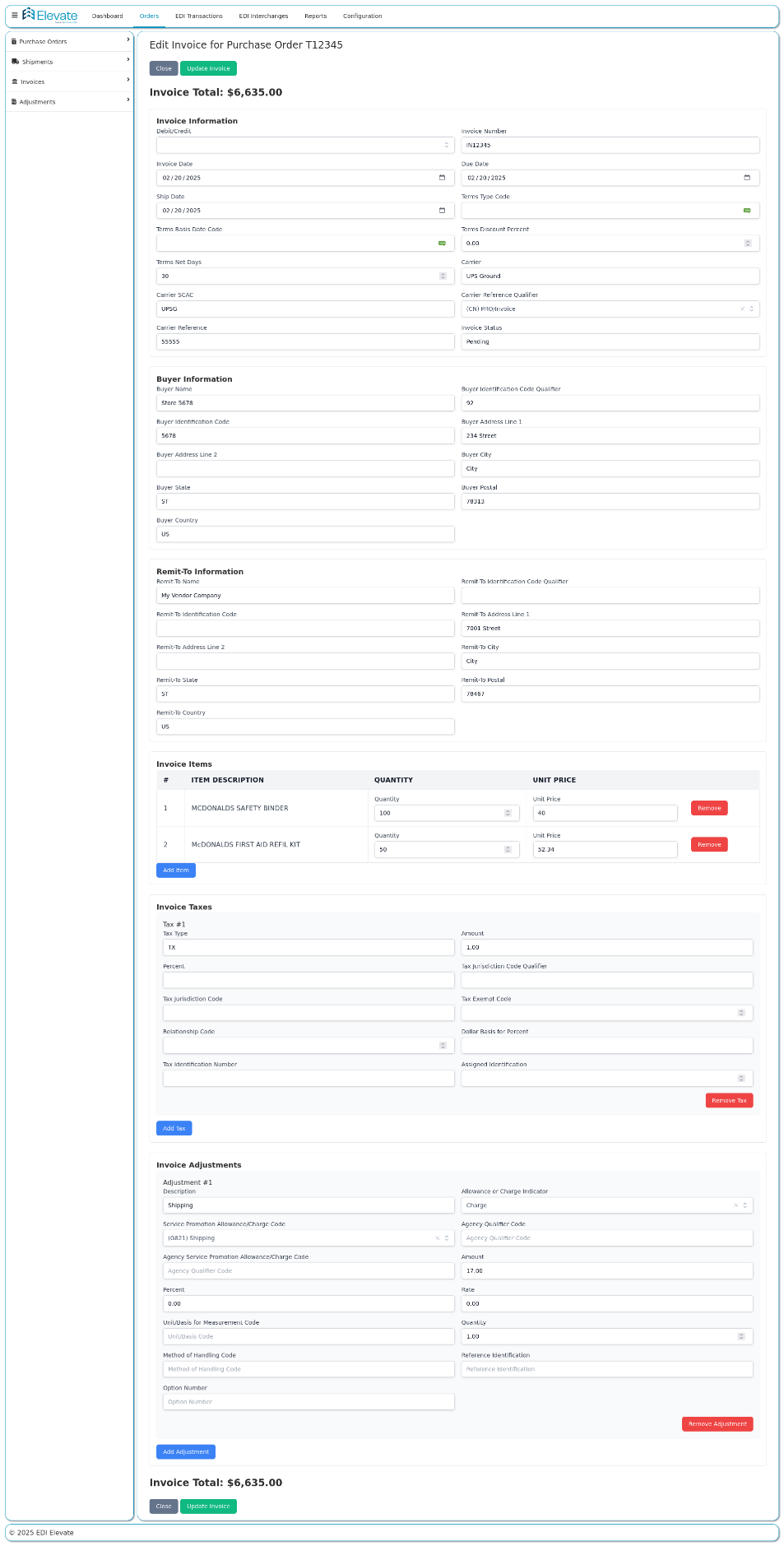
EDI 810 Invoice in Elevate
How to Start Sending EDI 810 Invoices
- Get your trading partner’s implementation guide — Every retailer publishes their specific EDI 810 requirements. This document defines required segments, valid values, invoice timing windows, and whether a matching EDI 856 is required before the 810.
- Set up EDI connectivity — Choose your communication method: AS2 (most common for large retailers), SFTP, or VAN. Your trading partner’s guide will specify which they require.
- Build or configure your 810 map — Your EDI system needs a map that translates your internal invoice data into a valid EDI 810 format per your trading partner’s specification.
- Connect to your ERP — The real value of EDI 810 is automatic invoice generation from your ERP (NetSuite, SAP, Acumatica, QuickBooks, etc.) without manual entry. When a shipment is confirmed, the 810 should be generated automatically.
- Align your 810 to the EDI 856 — Most retailers require the invoiced quantities to exactly match the quantities on the ASN. Build this validation into your workflow before transmitting.
- Test with your trading partner — Most retailers require a testing cycle before going live. You will send test invoices and get sign-off before production transactions begin.
- Go live and monitor — Once live, monitor for EDI 997 acknowledgements and watch for payment discrepancies that could indicate invoice mapping errors.
Need help with EDI 810 implementation and more?
Elevate handles every step from trading partner setup to ERP connection to ongoing invoice monitoring. No IT team required.
Real-World Example: Supplier Sending an EDI 810
A manufacturer ships 1,200 units to a retailer.
-
- The warehouse sends an EDI 856 ASN with actual shipped quantities
- Elevate validates shipment data
- The EDI 810 is generated automatically from shipped quantities
- The invoice is sent electronically
- The retailer’s system matches it to the PO and ASN
- Payment is scheduled without manual review
If the invoice matches perfectly, no one touches it.
How EDI 810 Works Across Different Fulfillment Models
- DC replenishment (most common): Supplier ships bulk to a retailer’s distribution center and sends a single EDI 810 referencing the PO. Invoice quantities must match the EDI 856 ASN. Payment terms and freight allowances are standard.
- Direct-to-store (DTS): When a supplier ships to multiple store locations on a single PO, they may send one consolidated EDI 810 or individual invoices per ship-to location, depending on the retailer’s requirements.
- Drop-ship: The supplier ships directly to the end consumer and invoices the retailer. The EDI 810 references the retailer’s PO number, not the consumer’s order. Some drop-ship programs require invoices within 24 hours of shipment.
- Vendor-managed inventory (VMI): Since the supplier initiates the replenishment order in VMI programs, the EDI 810 must reference the buyer-approved PO or release number generated as part of the VMI workflow.
Why EDI 810 Accuracy Is Critical
Invoice errors are expensive.
Common problems include:
-
- Quantity mismatches
- Pricing discrepancies
- Missing PO references
- Incorrect freight or tax calculations
These issues lead to:
-
- Payment delays
- Short pays
- Chargebacks
- Manual reconciliation work
A clean EDI 810 dramatically reduces these issues.
Common Challenges with EDI 810 Invoices
- Invoice/PO number mismatch — The PO number referenced in the BIG segment must exactly match the original EDI 850. Any deviation causes an automatic hold in the buyer’s AP system. Always pull the PO number directly from the inbound 850 without reformatting.
- Quantity discrepancy vs. the EDI 856 — Most retailers do a three-way match: 850 vs. 856 vs. 810. If the invoiced quantity differs from the shipped quantity on the ASN, the invoice is flagged or short-paid. Generate your 810 from confirmed shipped quantities, not ordered quantities.
- Pricing discrepancies — If the unit price on the 810 differs from the 850, the buyer’s system flags the discrepancy and holds payment. Maintain a synchronized price file and validate invoice pricing before transmission.
- Missing or incorrect remit-to information — The N1*RI segment must contain your correct remit-to name and address. Errors here route payment to the wrong entity or delay processing entirely.
- Incorrect or missing payment terms — The ITD segment defines discount terms and net due date. Errors here cause AP systems to calculate incorrect payment dates, resulting in missed early-pay discounts or late payment penalties.
- Invoicing before shipping — Many retailers reject EDI 810s that arrive before the corresponding EDI 856. Always transmit the ASN before or alongside the invoice.
- Missing allowances or freight segments — If your trading partner agreement includes freight allowances, co-op deductions, or early-pay discounts, these must be mapped in the SAC segment. Omitting them causes discrepancies that get deducted from payment without notice.
Last updated: March 2026
FAQs
Q1: Who sends the EDI 810 and who receives it?
The EDI 810 is sent by the supplier, vendor, or manufacturer. It is received by the buyer, retailer, or distributor. The flow is always from supplier to buyer. It is the electronic equivalent of submitting an invoice for payment after goods have shipped.
Q2: What triggers an EDI 810?
An EDI 810 is triggered when a supplier ships goods and needs to request payment. In automated systems, the 810 is generated directly from the confirmed shipment data in the ERP once the EDI 856 Advance Ship Notice has been transmitted. The 810 always references the original EDI 850 Purchase Order number.
Q3: What is the difference between an EDI 810 and an EDI 856?
The EDI 856 (Advance Ship Notice) is a logistics document that tells the buyer what was shipped, when, and how. The EDI 810 is a financial document that tells the buyer how much to pay. The 856 comes first; the 810 follows. Most retailers require the 856 before they will process the 810.
Q4: What is the response to an EDI 810?
There are two response documents. The EDI 997 (Functional Acknowledgement) confirms technical receipt of the invoice file. The EDI 820 (Payment Order / Remittance Advice) is the buyer’s payment confirmation, which tells the supplier which invoices are being paid and for how much.
Q5: What happens if an EDI 810 is rejected?
An EDI 810 rejection can happen at two levels. A technical rejection (indicated by an EDI 997 with error codes) means the file had structural or syntax errors. A business-level rejection means the invoice did not pass the buyer’s three-way match — the invoiced quantities, pricing, or PO reference did not align with the 850 and 856 on file. Technical rejections require a corrected retransmission. Business rejections require reconciliation with the buyer’s AP team.
Q6: How long does a supplier have to send an EDI 810 after shipping?
Invoice timing windows vary by trading partner. Most major retailers require the EDI 810 to be transmitted within 24 to 72 hours after the goods ship. Some drop-ship programs require same-day invoicing. Sending an 810 too early (before the 856) or too late can result in payment delays or compliance chargebacks.
Q7: What is a chargeback related to EDI 810?
An EDI 810-related chargeback is a financial penalty applied by a retailer when a supplier’s invoice does not comply with their requirements. Common triggers include invoiced quantities differing from shipped quantities, incorrect pricing, missing PO references, invoicing outside the allowed timing window, and missing required segments. Chargeback amounts vary by retailer — they can be a flat fee per violation or a percentage of the invoice value.
Q8: What is the three-way match in EDI?
The three-way match is the validation process a buyer’s AP system performs when an EDI 810 invoice arrives. The system compares the invoice (810) against the original purchase order (850) and the advance ship notice (856). If all three documents agree on quantities, pricing, and item identifiers, payment is released automatically. Any discrepancy flags the invoice for manual review.
Q9: What ERP systems can generate EDI 810 invoices automatically?
ERP systems like NetSuite, SAP, Acumatica, and QuickBooks do not generate EDI 810 files natively. You need to integrate your ERP with an EDI platform like Elevate that maps your invoice data into the correct EDI 810 format and transmits it to your trading partner automatically when a shipment is confirmed.
Q10: How do I set up EDI 810 with Walmart?
To send EDI 810 invoices to Walmart: download Walmart’s EDI implementation guide from Retail Link; set up AS2 connectivity or connect through a Walmart-approved VAN; build your 810 map to Walmart’s specifications, ensuring quantities match the 856 ASN; connect your ERP so invoices generate automatically from confirmed shipments; and complete Walmart’s EDI testing cycle before going live. A managed EDI provider like Elevate has pre-built Walmart maps ready to deploy.
Q11: What is the EDI 810 order-to-cash cycle?
The full order-to-cash cycle ending with EDI 810 payment is: (1) Buyer sends EDI 850 Purchase Order. (2) Supplier sends EDI 997 to confirm receipt. (3) Supplier sends EDI 855 to acknowledge the order. (4) Supplier picks, packs, and ships the goods. (5) Supplier sends EDI 856 Advance Ship Notice when goods depart. (6) Supplier sends EDI 810 Invoice requesting payment. (7) Buyer performs a three-way match (850 vs. 856 vs. 810) and releases payment. (8) Buyer sends EDI 820 Remittance Advice confirming payment details.
Q12: Can an EDI 810 be cancelled or corrected after it is sent?
The EDI 810 itself cannot be recalled once transmitted. If the invoice contains an error, the supplier typically sends a credit memo (EDI 812 Credit/Debit Adjustment) to reverse or adjust the original invoice, then retransmits a corrected 810 if needed. The process varies by trading partner — always check the implementation guide for void and resubmission procedures.
Q13: What is the difference between an EDI 810 and a paper invoice?
A paper invoice requires manual entry on both the supplier’s and the buyer’s side, creating risk of transcription errors, lost documents, and payment delays. An EDI 810 transmits directly from the supplier’s system into the buyer’s AP system with no manual data entry required. This eliminates errors, accelerates payment processing, and creates an automatic digital audit trail from shipment through payment.
Q14: Do I need EDI software to send an EDI 810?
Yes. You need an EDI-capable system like Elevate to generate, validate, and transmit an EDI 810. Your three options are:
(1) in-house EDI software that your IT team manages;
(2) a fully managed EDI provider like Elevate that handles setup, mapping, trading partner connectivity, and ongoing support with no IT team required; or
(3) a web EDI portal for very low transaction volumes where you manually key in invoice data.
Most SMBs choose a managed provider because it requires no internal EDI expertise.
Table of Content
Read next