
EDI 856 Definition
An EDI 856 transaction, also known as an Advance Shipping Notice or ASN is used to communicate the contents of a fulfilment of an order between trading partners. A supplier sends an ASN in advance to inform the trading partner that shipment is on the way so that the trading partner can receive the merchandise, track inbound inventory and plan resources ahead in time. Suppliers requiring ASNs may also require GS1-128 barcode labels that contain the supplier’s vendor, carton and ASN number.
Sent by: Supplier / Vendor
Received by: Retailer / Buyer / Distributor
What EDI 856 Represents in Real Life
EDI 856 is not just a shipping notification. It is the bridge between physical goods and system-level visibility.
When an ASN is sent correctly:
-
- Retailers know exactly what is arriving before the truck does
- Warehouses can scan cartons instead of counting cases
- Inventory is staged accurately
- Receiving delays and chargebacks are avoided
This document is where supply chains either run smoothly or fall apart.
EDI 856 Specification
Components of an EDI 856 Advance Ship Notice include:
- Purchase Order (EDI 850) information
- Shipping Package information such as carton barcodes printed
- Ship notice number
- Pallets Information
- Shipment Moving Information (ship to, ship from)
- Shipment Tracking Information
EDI 856 can also include:
- Product Description
- Product Quantity Information
- Packaging Types Information
- Ship Delivery Date
- Carrier Reference Information
What is the response to EDI 856?
Related EDI Transactions
- EDI 810 – Invoice
- EDI 812 – Credit / Debit Adjustment
- EDI 820 – Payment or Order Remittance
- EDI 832 – Price/Sales Catalog
- EDI 830 – Planning Schedule with Release Capability
- EDI 846 – Inventory Inquiry
- EDI 850 – Purchase Order
- EDI 855 – Purchase Order Acknowledgement
- EDI 860 – Purchase Order Change Request
- EDI 867 – Product Transfer and Resale Report File Format
- EDI 870 – Order Status Report
- EDI 875 – Grocery Products Purchase Order
- EDI 990 – Response to a Load Tender
- EDI 997 – Functional Acknowledgement
EDI 856 Sample File Format
ISA*00*0000000000*00*0000000000*12*111111111 *12*222222222 *230316*1654*U*00401*000005313*0*P*>~GS*SH*111111111*222222222*20230316*1654*5313*X*004010~ST*856*9383~BSN*00*9383*20230316*1653*0001~HL*1**S~TD5*B*2*UPSN*U*NS~REF*CN*19029027~N1*ST**92*0593~HL*2*1*O~PRF*0084-4015362-0593~PID*S**VI*ZZ~TD1*CTN25*8~N1*BY**92*0593~HL*3*2*P~PO4*8~MAN*GM*00085000410202611381~HL*4*3*I~LIN*1*IN*12345678*SK*123~SN1**8*EA~HL*5*2*P~PO4*8~MAN*GM*00085000410202611398~HL*6*3*I~LIN*1*IN*12345678*SK*123~SN1**8*EA~SE*24*9383~GE*1*5313~IEA*1*000005313~
What an EDI 856 Looks Like Inside Elevate
Raw ASNs are complex and hierarchical.
Elevate translates them into a visual structure that mirrors how shipments are packed.
Inside Elevate, teams can see:
- Shipment number and ship date
- Carrier and tracking information
- Pallet and carton hierarchy
- Items packed into each carton
- Quantities shipped vs ordered
- Ship-to and ship-from locations
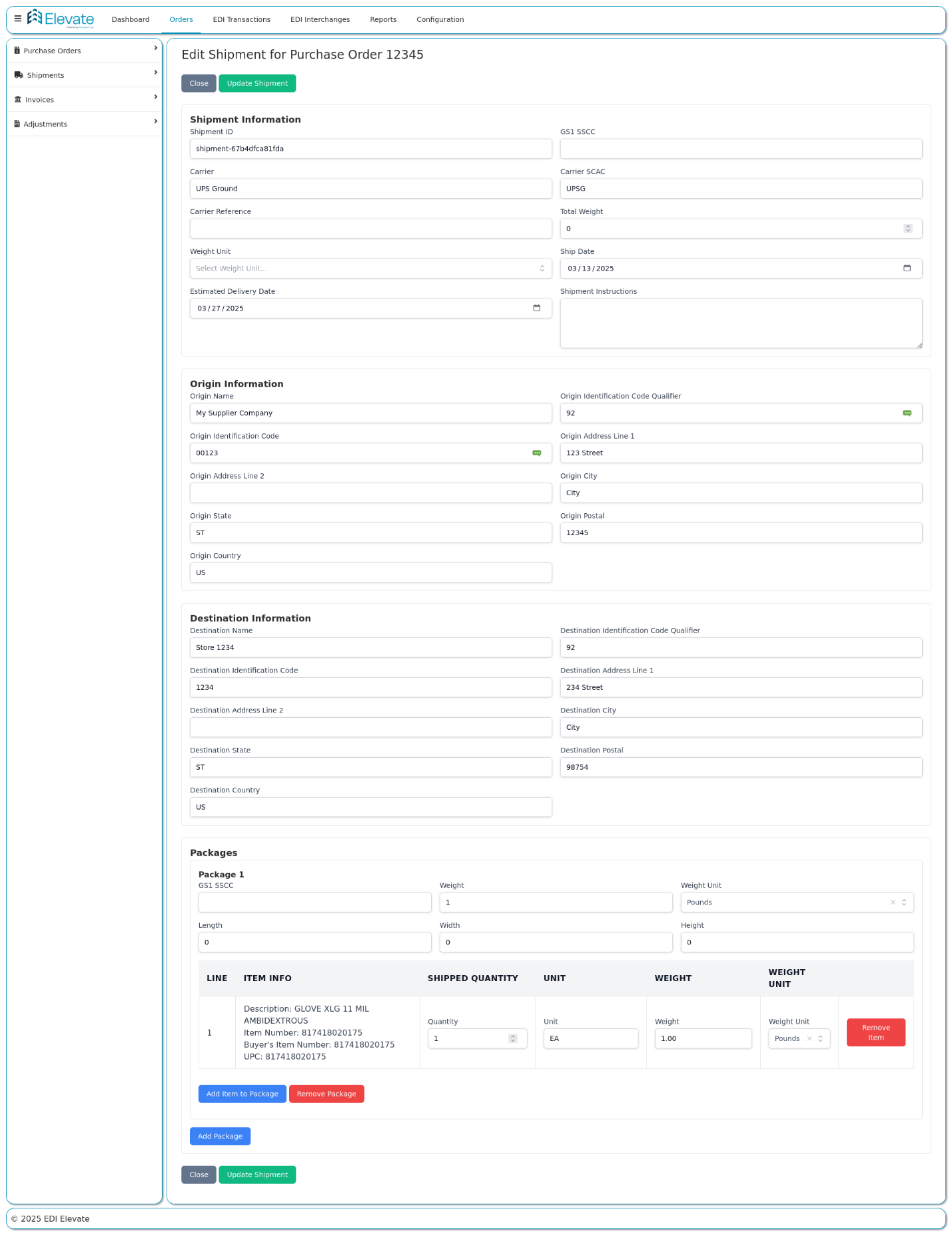
EDI 856 Advance Ship Notice in Elevate
This clarity is critical when troubleshooting receiving issues.
How to Start Sending EDI 856 to Your Trading Partners
- Get your trading partner’s EDI 856 implementation guide:
Every retailer publishes their specific ASN requirements with required segments, HL hierarchy, GS1-128 labeling specs, and timing windows. Walmart’s guide is available through Retail Link. Target’s through Partners Online. This is your starting point for every new trading partner. - Determine your communication method:
Most major retailers require AS2 for EDI 856 transmission. Some accept SFTP or VAN. Your trading partner’s guide specifies which is required. AS2 is the most common for Walmart, Target, Amazon, and Home Depot. - Set up GS1-128 label printing:
Before you can send an accurate 856, your warehouse needs to print GS1-128 compliant barcode labels for every carton and pallet based on your trading partner requirements. The SSCC-18 number on the label must match the MAN segment in your ASN exactly. This is a physical warehouse process not just a software one. Elevate helps with GS-128 label creation. - Build or configure your EDI 856 map:
Your EDI system needs a map that translates your shipment data into the exact 856 format your trading partner requires. Requirements vary significantly by retailer. For example, a Walmart 856 map is different from a Target 856 map. - Connect to your WMS or shipping system:
The most error-prone 856s are built manually. The most accurate ones are generated automatically from your warehouse management system (WMS) or shipping software when a shipment is confirmed. This connection is what eliminates SSCC mismatches and quantity errors. - Complete trading partner testing and go live
Every retailer requires a testing cycle before accepting live ASNs. You will submit test transactions, receive feedback, make corrections, and get written sign-off before your first production shipment.
Don’t Want to Manage Any of This Yourself?
Elevate handles your entire EDI 856 setup along with other EDI documents from trading partner connectivity, label printing coordination, map building, testing to go-live.
Real-World Example: Manufacturer Sending an ASN
A manufacturer ships 12 pallets to a retailer.
- The warehouse builds pallets and cartons
- GS1-128 labels are printed
- The EDI 856 is generated from the packing data
- ASN is sent before the truck departs
- Retail DC schedules receiving
- Cartons are scanned on arrival
- Inventory updates automatically
No manual counting. No surprises.
How EDI 856 Works Across Fulfillment Models
- Direct-to-warehouse/DC: Standard ASN with full pallet/carton hierarchy. Most common use case.
- Drop shipping: ASN sent directly to consumer address. Simplified hierarchy, tracking info is critical.
- Cross-docking: ASN must arrive before the shipment. Speed is the priority — any delay breaks the flow.
- 3PL managed: 3PL generates the ASN on the supplier’s behalf. Coordination on GS1-128 labels is essential.
Why EDI 856 Accuracy Is Critical
The ASN is often the most sensitive EDI document.
Common issues include:
-
- Incorrect carton counts
- Missing pallet hierarchy
- Item quantities not matching shipment
- Labels not matching ASN data
- Wrong ship-to location
These errors lead to:
-
- Receiving delays
- Manual recounts
- Chargebacks
- Payment delays
A clean ASN prevents all of this.
Common Challenges with EDI 856 ASNs
- Different retailers require different ASN structures
- Multi-location shipments complicate hierarchy
- Partial shipments require multiple ASNs
- 3PLs must coordinate ASN creation
- ERP migrations disrupt shipment data
Flexible EDI systems are essential here.
What Happens After an EDI 856 Is Sent
Once the receiver gets the ASN:
-
- They send an EDI 997 Functional Acknowledgment
- Receiving systems prepare for arrival
- Accounting matches ASN to invoice
- Inventory planning updates inbound stock
The ASN is the last operational checkpoint before billing.
Last updated: March 2026
FAQs
Q1: What happens if I don't send an EDI 856?
A missing EDI 856 typically results in a chargeback from the retailer. The receiving warehouse cannot prepare for the shipment, has to manually count every item on arrival, and flags the supplier for non-compliance. Chargeback amounts vary by retailer but commonly range from $50 per ASN to 1-3% of the invoice value. Repeated non-compliance can damage the trading partner relationship and in some cases result in being put on a compliance watch list.
Q2: What are the most common reasons an EDI 856 gets rejected?
The most common rejection reasons are: incorrect or missing SSCC-18 barcode numbers in the MAN segment, item quantities in the ASN not matching what was physically shipped, wrong purchase order reference number, late transmission (ASN arrived after the shipment), incorrect HL hierarchy structure, and UPC or GTIN codes that do not match the buyer’s item master. Each retailer has their own validation rules. For example: what passes at Walmart may still fail at Target.
Q3: What is an EDI 856 chargeback and how do I avoid it?
An EDI 856 chargeback is a financial penalty applied by a retailer when your ASN is missing, late, inaccurate, or non-compliant with their specific requirements. To avoid chargebacks: send the ASN during shipment (not before, not after), ensure SSCC-18 labels on cartons exactly match what is in the ASN, validate quantities against the physical pack before transmitting, and review each trading partner’s implementation guide regularly since requirements change. Automated ASN generation directly from your WMS or EDI platform eliminates most manual errors.
Q4: Which retailers require EDI 856?
Most major retailers require EDI 856 as a mandatory compliance document. These include Walmart, Target, Amazon, Home Depot, Lowe’s, Costco, Chewy, Kroger, Wayfair, Tractor Supply, Albertsons, and C&S Wholesale Grocers. Requirements vary significantly by every retailer. For example, Walmart requires SSCC-18 on every carton and pallet, Amazon requires the ASN within 30 minutes of ship confirmation, and Target enforces strict item attribute matching including case pack and barcode accuracy.
Q5: Does Walmart require an EDI 856?
Yes. Walmart requires an EDI 856 ASN for all shipments to their distribution centers. Walmart’s ASN requirements include SSCC-18 barcodes on all cartons and pallets, a specific HL hierarchy structure, GS1-128 compliant labels, and PRO numbers for LTL shipments. Walmart validates ASNs through their Retail Link portal and applies chargebacks for missing, late, or inaccurate ASNs. Their specific requirements are detailed in the Walmart Supplier EDI Implementation Guide.
Q6: Does Amazon require an EDI 856?
Yes. Amazon requires an EDI 856 ASN for vendors shipping to their fulfillment centers. Amazon’s requirements are among the strictest — the ASN must be transmitted within 30 minutes of carrier pickup confirmation, must include carton-level detail with SSCC-18 barcodes, and UPC/ASIN codes must match Amazon’s item master exactly. Late or missing ASNs with Amazon result in automated chargebacks through Vendor Central.
Q7: When should EDI 856 be sent?
The EDI 856 should be sent at the time of physical shipment — typically when the carrier scans the pickup or when the shipment leaves the warehouse dock. Some retailers have stricter windows: Amazon requires ASN within 30 minutes of ship confirmation. Sending too early (before the shipment is actually packed) or too late (after the goods have already arrived) both cause problems and can trigger chargebacks.
Q8: What triggers an EDI 856?
An EDI 856 is triggered by the physical act of shipping specifically when a purchase order (EDI 850) has been received, goods have been picked and packed, GS1-128 labels have been applied to cartons and pallets, and the carrier has confirmed pickup. In automated systems, the ASN is generated and transmitted automatically when the warehouse management system (WMS) records a confirmed shipment.
Q9: What happens after an EDI 856 is sent?
After the buyer receives the EDI 856, they send back an EDI 997 Functional Acknowledgement confirming receipt. The buyer’s warehouse management system then uses the ASN data to pre-stage inventory, schedule dock labor, and prepare receiving workflows. When the shipment physically arrives, warehouse staff scan SSCC-18 barcodes on cartons to verify against the ASN instead of manually counting items. Inventory is updated automatically.
Q10: Can I send an EDI 856 for a partial shipment?
Yes. If you are unable to fulfill a complete purchase order in one shipment, you send a separate EDI 856 for each physical shipment. Each ASN covers only what is on that specific truck. Make sure each ASN references the correct purchase order line items and quantities for that partial fulfillment mismatches between the ASN and the physical shipment are one of the most common chargeback triggers.
Q11: Do I need to send a new EDI 856 if the shipment details change?
Yes. If a shipment is modified after the ASN has been sent. For example, when a quantity changes or a carton is added, you need to send a corrected or replacement ASN before the shipment arrives. The process for correcting an ASN varies by trading partner; some require a voided ASN followed by a new one, others accept an updated transmission. Always check your trading partner’s implementation guide for their specific correction process.
Q12: What is EDI 856?
An EDI 856, also called Advance Ship Notice or ASN, is an electronic document sent by a supplier to a buyer before a shipment physically arrives. It tells the buyer exactly what is being shipped, how it is packed, which carrier is moving it, and when it will arrive. It is the electronic equivalent of a packing slip except it travels ahead of the truck so the buyer can prepare for receiving before the goods show up.
Q13: What does ASN stand for in EDI?
ASN stands for Advance Ship Notice. In EDI, an ASN is transmitted using the EDI 856 transaction set under the ANSI X12 standard. Some companies also refer to it as an Advance Shipping Notification or Ship Notice/Manifest. All three terms refer to the same document.
Q14: What is the difference between EDI 856 and a packing slip?
A packing slip is a paper document physically included inside or attached to a shipment. An EDI 856 is sent electronically before the shipment arrives, sometimes hours in advance. This allows the buyer’s warehouse system to automatically prepare receiving workflows, allocate dock doors, and pre-stage inventory locations before the truck pulls in. The EDI 856 replaces the manual packing slip process entirely.
Q15: Who sends the EDI 856 and who receives it?
EDI 856 is sent by the supplier or vendor, typically when the shipment leaves the warehouse or when the carrier scans the pickup. It is received by the buyer, retailer, or distributor, whichever party is expecting the goods.
Q16: Is EDI 856 the same as EDI 810?
No. The EDI 856 (ASN) describes what is being shipped and how. EDI 810 is an invoice; it requests payment for what was shipped. The 856 is sent at ship time; the 810 is sent after delivery or per payment terms. Many buyers perform three-way matching by comparing the EDI 850 (purchase order), EDI 856 (what was shipped), and EDI 810 (invoice) to confirm everything aligns before releasing payment.
Q17: How do I set up EDI 856 with a new trading partner?
Setting up an EDI 856 with a new trading partner involves four steps:
(1) Obtain the trading partner’s EDI implementation guide, which specifies their exact requirements for the ASN including required segments, HL hierarchy, timing, and labeling.
(2) Set up the communication method — AS2, SFTP, or VAN as specified by the trading partner.
(3) Build or configure the EDI 856 map in your EDI system to match their requirements.
(4) Complete testing in your trading partner’s test environment and get sign-off before going live.
A managed EDI provider like Elevate handles all four steps on your behalf while you run your business.
Q18: Do I need my own EDI software to send an EDI 856?
You have three options:
- build and manage EDI in-house using EDI software (requires technical expertise and ongoing maintenance)
- use a managed cloud EDI software like Elevate that handles everything for you like an outsourced EDI department (fastest and lowest internal resource requirement)
- or use a web EDI portal provided by your trading partner for very low transaction volumes (manual but no software needed).
For most small and mid-sized suppliers, a fully managed provider is the most practical choice as they handle mapping, trading partner communication, testing, and ongoing compliance updates.
Q19: How long does it take to set up EDI 856 with Walmart or Amazon?
For a straightforward setup with no ERP integration, expect 2-4 weeks from kickoff to go-live with most trading partners. If you need ERP integration (connecting your NetSuite, SAP, Acumatica, or other system to generate ASN data automatically), the timeline extends to 6-12 weeks depending on complexity. The longest delays typically come from waiting on trading partner test response times not the technical build itself.
Q20: What information do I need to send an EDI 856?
To generate an EDI 856 you need: the purchase order number(s) being fulfilled, item details (UPC/GTIN, SKUs, quantities), packaging structure (how items are packed into cartons, how cartons are stacked on pallets), SSCC-18 numbers for each carton and pallet, ship date and estimated delivery date, carrier name and SCAC code, tracking number or BOL number, and ship-from and ship-to addresses. Most of this data comes from your warehouse management system at the point of packing and shipping.
Q21: What is the HL loop in an EDI 856?
The HL (Hierarchical Level) segment is what makes the EDI 856 unique among EDI documents. It defines the physical packing structure of a shipment in a nested hierarchy.
The standard hierarchy goes: Shipment (S) → Order (O) → Pack/Pallet (P) → Item (I). Each HL level references its parent, which tells the receiving system how items are physically organized like which items are in which carton, which cartons are on which pallet. Getting the HL structure wrong is one of the most common technical rejection causes.
Q22: What is an SSCC-18 and why does it matter for EDI 856?
SSCC-18 (Serial Shipping Container Code) is an 18-digit globally unique identifier assigned to a logistics unit — a carton, pallet, or any shipping container. It is encoded in a GS1-128 barcode label applied to the outside of each carton and pallet. In the EDI 856, the SSCC-18 appears in the MAN segment and links the physical label to the electronic ASN data. When the buyer’s warehouse scans the barcode on arrival, their system automatically matches it to the ASN and confirms contents without opening the carton. If the SSCC-18 in the ASN does not match the label on the box, receiving breaks down.
Q23: What is the difference between EDI 856 and EDI 945?
The EDI 856 is sent by a supplier directly to a buyer when the supplier controls the shipment. The EDI 945 (Warehouse Shipping Advice) is sent by a third-party logistics provider (3PL) or warehouse to the supplier/depositor to confirm that a shipment has gone out on their behalf. In a 3PL scenario, the sequence is: buyer sends EDI 940 (Warehouse Shipping Order) to the 3PL, the 3PL ships the goods and sends an EDI 945 back to the supplier, and the supplier then generates and sends the EDI 856 to the buyer based on the 945 data.
Q24: Can one EDI 856 cover multiple purchase orders?
Yes. A single EDI 856 can reference multiple purchase orders in the same shipment. Each purchase order gets its own HL Order level loop (HL*O) within the ASN hierarchy. This is common when a supplier consolidates multiple smaller orders onto one truck for a single delivery. However, each trading partner’s implementation guide may have specific rules about multi-PO ASNs, some retailers prefer one ASN per PO.
Q25: What EDI standard version should I use for EDI 856?
Most retailers in the US use ANSI X12 version 004010 for EDI 856. Some larger retailers have moved to 005010. Amazon uses 004010. Always confirm the required version with your trading partner’s implementation guide before building your map using the wrong version will cause transmission failures. For European trading partners, the EDIFACT equivalent of the EDI 856 is the DESADV (Dispatch Advice Message).
Table of Content
Read next
The EDI 860 transaction set is called the Purchase Order Change Request that is used by buyers to request changes in the Purchase Order (EDI 850) they previously submitted, or by a buyer to confirm acceptance of changes made by the seller to a purchase order, or by mutual agreement of the two parties.