
Highlights
- EDI billing replaces manual invoicing by exchanging the EDI 810 Invoice automatically between your business and your trading partner, removing the need for emailed PDFs, paper invoices, or manual data entry.
- The full billing cycle usually involves five EDI documents working together: the 850 Purchase Order, 855 PO Acknowledgment, 856 Advance Ship Notice, 810 Invoice, and 997 Functional Acknowledgment.
- Most billing problems are not caused by the 810 itself. They come from upstream issues like inaccurate item pricing, mismatched units of measure, missing PO references, or ASNs that do not align with what was billed.
- For small businesses, the easiest way to get EDI billing right is to use a fully managed cloud platform like Elevate, which handles 810 setup, mapping, testing, and ongoing monitoring without requiring an in-house EDI team.
Introduction
If you run a business in retail, construction, manufacturing or distribution or healthcare, staying ahead of the curve in terms of technology is essential for maintaining efficiency and competitiveness. One area where technology has made a significant impact is in billing processes, specifically through Electronic Data Interchange (EDI). EDI billing automates and streamlines the exchange of billing information, making transactions faster, more accurate, and highly efficient. If you’re still relying on traditional paper-based billing methods, it might be time to consider the transformative benefits of EDI billing. Let’s delve into how EDI billing works and why it’s a game-changer for modern businesses.
What is EDI Billing?
The most common EDI billing document is the EDI 810 Invoice, which is the ANSI X12 standard used across North America for retail, manufacturing, distribution, and most other B2B industries. International businesses may use EDIFACT INVOIC instead, but the concept is identical.
When a retailer like Walmart, Target, Amazon, or Costco places an order with you, they expect the invoice for that order to come back as an EDI 810 that follows their specific formatting and timing rules. The 810 carries everything the buyer needs to match your invoice to their purchase order and pay you: PO number, line items, quantities shipped, prices, allowances, charges, taxes, and remit-to information.
Done correctly, EDI billing shortens your days-sales-outstanding, reduces invoice disputes, and removes most of the manual work from accounts receivable. Done poorly, it creates chargebacks, payment delays, and reconciliation headaches that often take more time to fix than the original invoice would have taken to send manually.
This guide explains how EDI billing actually works end to end, what documents are involved, where most small businesses run into trouble, and how to set up a billing process that does not break every time a trading partner updates their requirements.
EDI Billing vs EDI Invoicing: What is the Difference?
EDI billing and EDI invoicing are closely related concepts but are not exactly the same. EDI billing is a broader concept that includes all electronic exchanges related to billing, whereas EDI invoicing is a specific part of EDI billing that deals with the electronic exchange of invoices. Both aim to streamline and automate the billing process, improving efficiency, accuracy, and speed. Understanding the distinction between the two helps in effectively implementing and managing EDI systems within a business.
EDI invoicing refers specifically to the electronic exchange of the invoice document itself, almost always the EDI 810 in North America. It is the act of sending the bill.
EDI billing is the broader process around that document. It includes how the invoice is generated from upstream order and shipment data, how it is matched against the original purchase order and ASN, how acknowledgments and remittance advice flow back, and how exceptions are resolved when something does not match.
In practice, EDI invoicing is one step inside EDI billing. When a trading partner says they need you to be EDI compliant for invoicing, they usually mean the full billing cycle, not just the 810. Treating them as the same is what causes most small businesses to under-scope their EDI project.

EDI Standards Used in Billing
EDI billing relies on standardized formats so that a buyer’s accounting system can read your invoice without anyone reformatting it. Three standards dominate globally:
-
-
- ANSI X12 810 (Invoice) — the dominant standard in North America. If you are billing US or Canadian retailers like Walmart, Target, Amazon, Costco, Home Depot, or Kroger, this is almost certainly what they require.
- EDIFACT INVOIC — the international equivalent, used widely across Europe, Asia, and global supply chains.
- TRADACOMS Invoice — an older standard still used in parts of the UK retail sector, though most UK trading partners are migrating to EDIFACT or X12.
-
For most small businesses in the US, the practical answer is simple: you will be sending ANSI X12 810 invoices. Your EDI provider should handle the standard so you never have to think about the underlying format.
The Full EDI Billing Cycle: From Order to Payment
EDI billing does not happen in isolation. The 810 Invoice is the last document in a sequence that begins the moment a trading partner sends you a purchase order. To understand why your invoice is accepted or rejected, you need to understand the full cycle.
Here is the standard order-to-payment flow for most retail and wholesale relationships.
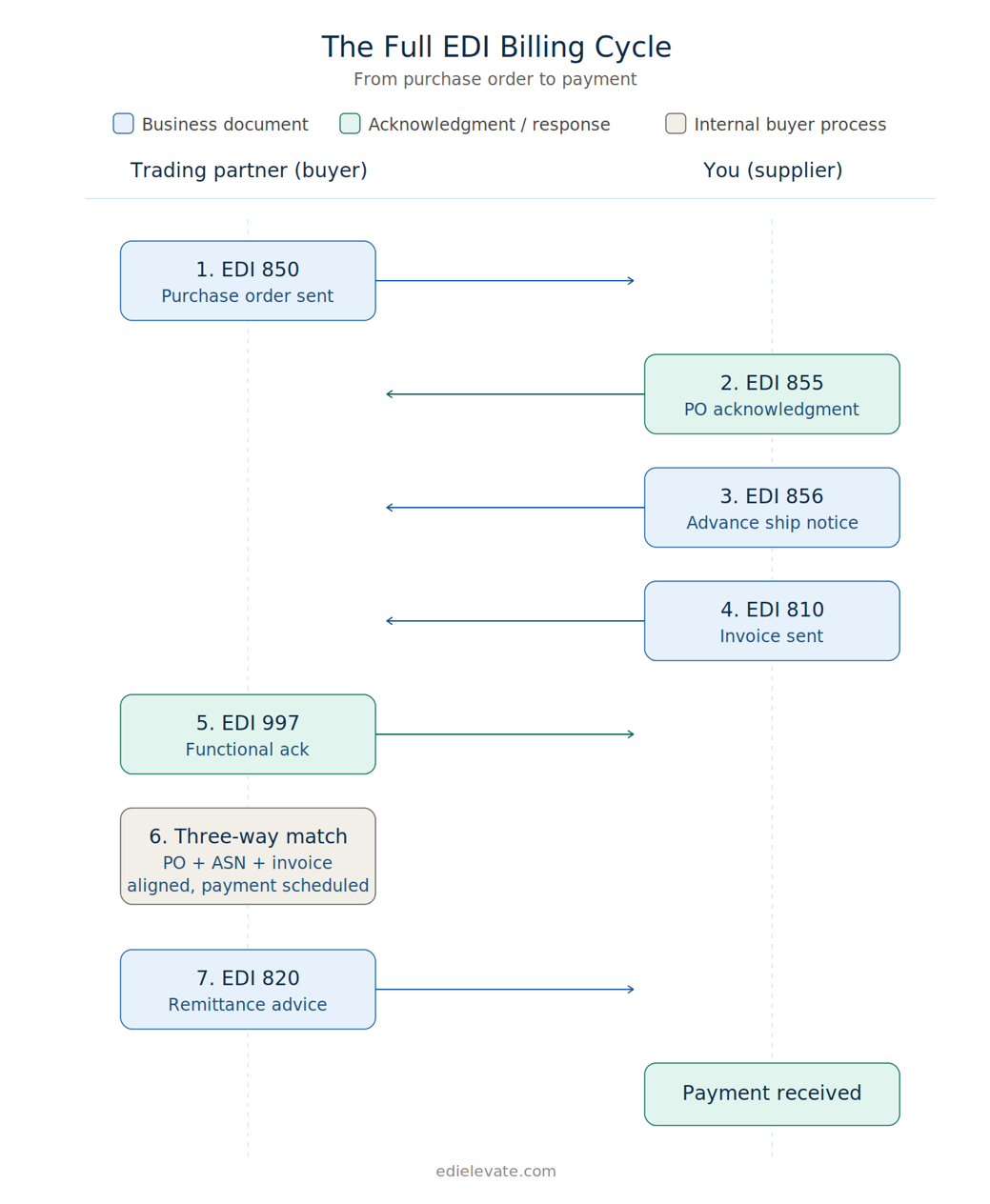
The full EDI billing cycle: from the buyer’s purchase order to the supplier’s payment confirmation
Step 1: The buyer sends an EDI 850 Purchase Order
EDI 850 is the inbound document that starts everything. It contains the PO number, ship-to location, item numbers, quantities, prices the buyer expects to pay, ship dates, and any special routing or labeling requirements. The PO number on this document is the single most important piece of data in the entire billing cycle. Every downstream document, including your 810, has to reference it correctly.
Step 2: You send an EDI 855 PO Acknowledgment (if required)
Some trading partners require an EDI 855 to confirm that you received the PO and to communicate whether you are accepting it as-is, accepting with changes, or rejecting it. Not every partner requires this document, but when they do, skipping it or sending it incorrectly can hold up the whole order.
Step 3: You ship the order and send an EDI 856 Advance Ship Notice
EDI 856 ASN tells the buyer what is in the shipment, how it is packed, when it shipped, and the tracking information. This is the most operationally complex document in the cycle, and it directly affects billing because the 810 you send next must match what you said you shipped on the ASN.
If your ASN says you shipped 100 units but your 810 invoices for 120, the invoice will be rejected or short-paid. Many billing disputes trace back to ASN-to-invoice mismatches rather than to the 810 itself.
Step 4: You send the EDI 810 Invoice
Once the order has shipped, you send the 810 to bill your trading partner. The 810 must reference the original PO number, match the items and quantities shipped, apply correct pricing and allowances, and arrive within the partner’s required timing window. Some retailers require the 810 within 24 hours of shipment. Others give you several days. Late invoices can trigger compliance penalties even when everything else is correct.
Step 5: A 997 Functional Acknowledgment confirms receipt
EDI 997 is the trading partner’s automatic confirmation that they received your 810 and that the file passed basic syntax validation. A 997 does not mean your invoice was accepted for payment. It only means the document arrived and was structurally valid. Business-level acceptance happens later when the buyer’s system matches your invoice to the PO and ASN.
Step 6: The buyer matches, approves, and pays
Behind the scenes, the buyer’s accounts payable system performs a three-way match between the PO, the receiving record (driven by your ASN), and your 810 Invoice. If everything aligns, payment is scheduled according to your contract terms. If something does not match, the invoice is flagged for review, short-paid, or rejected.
This is where strong upstream document accuracy pays off. Clean POs, accurate ASNs, and consistent pricing data make the three-way match work without manual intervention. That is the actual goal of EDI billing: getting paid on time without anyone touching the invoice manually.
Step 7: The buyer sends an EDI 820 Payment Order/Remittance Advice (when supported)
Many larger trading partners send an EDI 820 alongside their payment to tell you exactly which invoices are being paid, in what amounts, and with what deductions. The 820 is what closes the loop on the billing cycle: instead of guessing how to apply a lump-sum ACH payment across multiple invoices, your AR team gets a structured document that maps the payment to specific 810s.
Not every trading partner sends an 820, and not every small business is set up to consume one. But when it is part of your setup, automated cash application becomes possible and AR reconciliation goes from hours to minutes.
How EDI 810 Invoices Are Transmitted
The 810 itself is a standardized file. What changes from one trading partner to the next is the way that file gets delivered. The four most common transmission methods for EDI billing are:
-
-
- AS2 (Applicability Statement 2) — secure point-to-point delivery over the internet using digital certificates and encryption. Common for large retailers like Walmart and Amazon.
- SFTP (Secure File Transfer Protocol) — encrypted file transfer to a shared server. Widely used by mid-sized retailers, distributors, and 3PLs.
- VAN (Value Added Network) — a third-party network that routes EDI documents between trading partners. Still common in retail and grocery, especially for partners with many connections.
- HTTP/S and API — newer web-based transmission methods. Less common for traditional EDI billing but growing in use, especially for tech-forward trading partners.
-
For small businesses, the choice is usually dictated by the trading partner. A managed EDI provider should handle whichever protocol the partner requires without forcing you to set up certificates, firewall rules, or VAN accounts yourself. With Elevate, connectivity setup is part of onboarding regardless of which protocol your partners need.
Benefits of EDI Billing
- Efficiency
EDI billing automates manual billing processes, significantly reducing the time and labor required to process invoices. This efficiency allows businesses to focus on other critical tasks. - Accuracy
Manual data entry is prone to errors, which can lead to costly mistakes. EDI billing minimizes these errors by automating the data entry process, ensuring that information is accurate and consistent. - Speed
EDI billing speeds up the billing and payment cycle, enabling faster transactions and quicker access to funds. This rapid turnaround is essential for maintaining healthy cash flow. - Cost Savings
By eliminating the need for paper, printing, and postage, EDI billing reduces operational costs. The cost savings can be substantial, especially for businesses that process a high volume of invoices. - Improved Cash Flow
Faster billing and payment processes lead to improved cash flow management. With quicker access to funds, businesses can better manage their financial operations and invest in growth opportunities. - Enhanced Business Relationships
Streamlined transactions foster better business relationships. By making it easier for trading partners to do business with you, EDI billing helps build trust and reliability.
A Real-World Example: How EDI Billing Works in Practice
Let’s walk through a realistic example so the cycle becomes concrete.
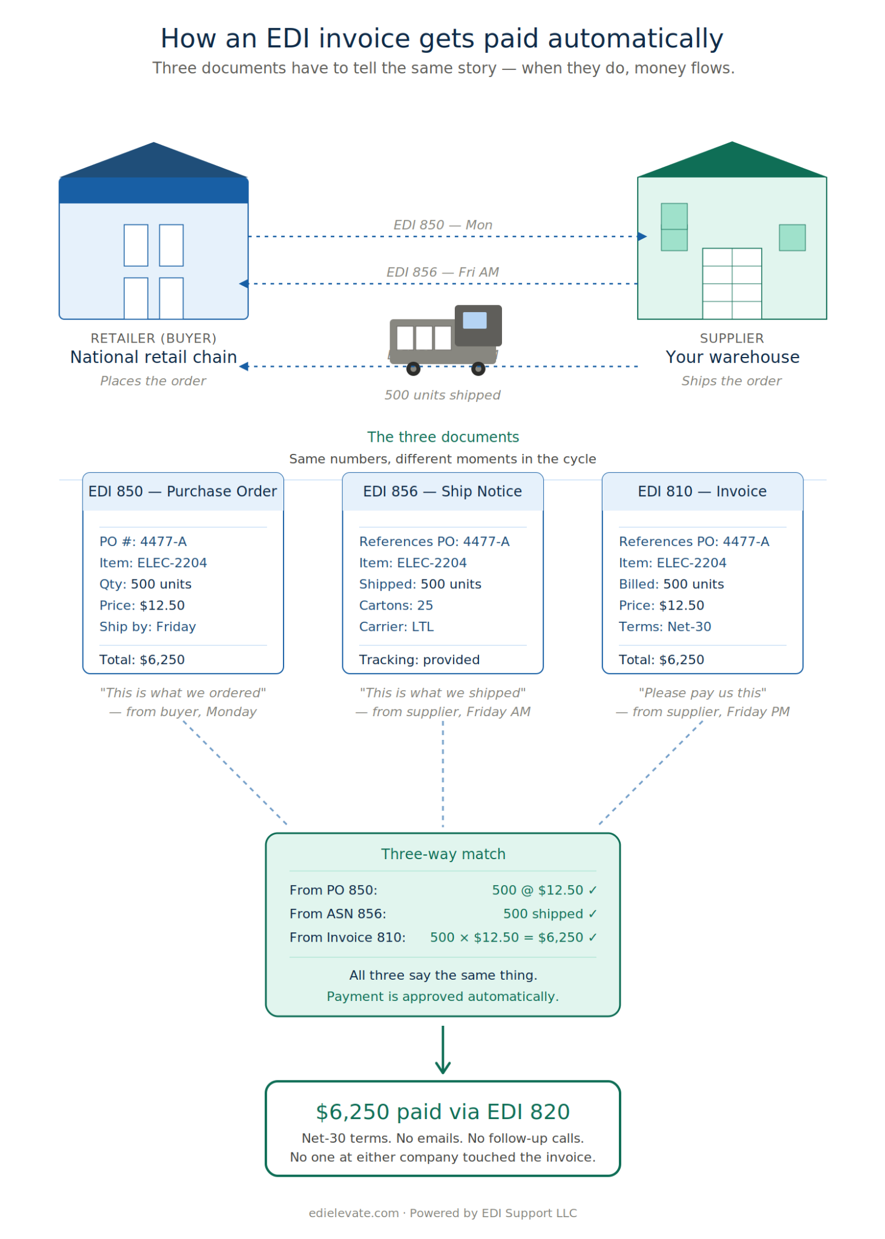
How EDI billing works in real life
Imagine you are a small consumer goods company supplying a national retailer. The retailer drops an EDI 850 Purchase Order into your EDI platform on Monday morning. The PO is for 500 units of one of your SKUs at an agreed price of $12.50 per unit, with a ship-by date of Friday and a routing requirement that the order ship via the retailer’s preferred LTL carrier.
Your EDI platform translates the 850 and pushes the order into your ERP or accounting system as a sales order. Your warehouse picks and packs the order on Thursday and ships 500 units on Friday morning. As soon as the shipment leaves the dock, your system generates an EDI 856 ASN with the carton-level detail, tracking number, and ship date, and your EDI platform transmits it to the retailer.
Within a few hours of the shipment confirming, your accounting system creates an invoice for $6,250 (500 units x $12.50). Your EDI platform translates that invoice into an EDI 810 and transmits it to the retailer. Minutes later, you receive a 997 Functional Acknowledgment confirming the 810 arrived and passed validation.
The retailer’s AP system runs the three-way match: the PO says 500 units at $12.50, the ASN confirmed 500 units shipped, and the 810 invoices for 500 units at $12.50. Everything aligns. The invoice is approved, and payment is scheduled for net-30 terms. No one at the retailer touched the invoice manually. No one at your company sent a follow-up email.
That is what a healthy EDI billing process looks like when the upstream data is clean and the documents are configured correctly. When it works, you barely notice it. When it does not work, every invoice becomes a phone call.
What is Inside an EDI 810 Invoice?
The EDI 810 follows the ANSI X12 standard, which means it has a defined structure that every trading partner can read. While each retailer adds their own specific requirements, the core data on a typical 810 includes:
-
-
- Invoice number and invoice date
- Original PO number from the matching 850
- Vendor information, including remit-to address and tax ID
- Buyer information, including bill-to and ship-to references
- Line-item detail: item numbers, descriptions, quantities, units of measure, and unit prices
- Allowances and charges, such as discounts, freight, and handling
- Tax information where applicable
- Total invoice amount and payment terms
- References to the related ASN, BOL, or shipment when required
-
Different retailers care about different fields. Some require GS1-128 references on the line items. Others require specific allowance codes for promotional pricing. Some want net pricing on the 810; others want gross pricing with allowances itemized. This is why one size never fits all in EDI billing, and why mapping the 810 correctly for each trading partner matters more than people expect.
Why EDI Billing Goes Wrong (and What Causes Most Disputes)
Most small businesses assume billing problems are caused by errors in the 810 itself. In reality, the 810 is usually the messenger, not the cause. The actual issues almost always live upstream in the data, the workflow, or the trading partner setup.
- Pricing mismatches between the PO and the invoice
If the buyer’s PO says $12.50 per unit and your invoice says $12.75, the invoice is going to be flagged. Even small mismatches caused by stale pricing in your ERP, missed promotional pricing, or incorrect tier discounts will trigger short-pays or rejections.
- Quantity differences between the ASN and the 810
If your ASN reports 480 units shipped due to a partial fulfillment, but your 810 invoices for the full 500, the buyer’s system will reject the discrepancy. Your billing process needs to invoice based on what actually shipped, not what was originally ordered.
- Wrong or missing PO references
The PO number must appear in the exact field and format the trading partner expects. A typo, a leading zero, or a reference number entered in the wrong segment will cause the invoice to fail the three-way match.
- Unit-of-measure inconsistencies
If the PO is in eaches and your 810 invoices in cases, your invoice totals will not match. UOM errors are one of the most common silent causes of invoice disputes for SMBs.
- Missing or incorrect allowance and charge codes
Retailers often require specific codes for freight allowances, promotional discounts, defective allowances, and similar adjustments. Sending the wrong code, or omitting one the buyer expects, will result in pricing variances they will not absorb.
- Late invoice transmission
Many retailers enforce strict timing rules, such as requiring the 810 within 24 hours of the ASN. Late invoices can trigger automatic compliance chargebacks even when the invoice itself is accurate.
- Tax and rounding errors
Tax calculation differences, currency rounding, or line-item totals that do not sum correctly will cause invoice rejections in stricter AP systems.
The pattern across all of these is the same: EDI billing exposes data and process gaps that smaller businesses can normally absorb when invoicing manually. Once invoicing is automated, those gaps become daily friction.
How to Automate EDI Billing the Right Way
Automating EDI billing is not just about turning on the 810 document. It is about building a process that produces clean, accurate invoices consistently, no matter how many trading partners you serve.
For small businesses, that usually involves five things working together:
- Reliable inbound order processing: Your 850 PO must land in the right place in your ERP or order system, with item numbers, prices, and units of measure preserved exactly as the buyer sent them.
- Accurate shipment data: Your warehouse process or 3PL must produce ASN data that reflects what actually shipped, including partial shipments, substitutions, and carton structure.
- Tight invoice generation logic: Your billing process should pull pricing from the original PO whenever possible, not from your master price list, to avoid pricing drift.
- Partner-specific 810 mapping: Each trading partner’s 810 needs to follow their implementation guide exactly, including allowance codes, references, and timing windows.
- Active monitoring after go-live: Someone has to watch for 997 acknowledgments, 824 application advice messages, and partner-side rejections so issues are caught before they turn into chargebacks.
Most small businesses do not have an internal EDI team to manage all of this. That is exactly why fully managed cloud EDI platforms exist.
Elevate was built for small and mid-sized businesses that need EDI billing to work reliably without hiring an EDI specialist. Elevate handles the parts of the 810 cycle that small teams typically struggle with:
- Mapping the 810 for each trading partner so it matches their implementation guide exactly
- Coordinating end-to-end testing so the PO, ASN, and 810 all align before go-live
- Supporting integration with your ERP or accounting system, including NetSuite, Acumatica and others, so invoices generate automatically from real shipment data
- Monitoring 997 acknowledgments and partner responses so failures are caught early
- Providing real human support when something goes wrong, instead of forcing you into a ticket queue
Elevate also keeps pricing transparent and contracts month-to-month. There are no surprise fees per trading partner, no charges for mapping changes, and no long-term lock-in. For small businesses already stretched thin, that combination of full management and predictable cost is usually what makes EDI billing actually sustainable.
Ready to make EDI billing easier?
Elevate gives small businesses a fully managed, affordable way to set up the 810 invoice cycle the right way without hiring an EDI specialist, signing a long-term contract, or worrying about hidden fees.