
Highlights
- EDI keeps orders, shipments, and invoices moving automatically without manual data entry.
- You only need a few core documents like the 850, 856, and 810 to support most real-world workflows especially in the retail world.
- With the right cloud platform like Elevate for SMBs, EDI becomes a growth enabler that helps companies scale faster with fewer headaches.
When people ask what EDI does, the answer is usually something like
“It lets companies exchange business documents electronically.” Technically true, but not very helpful.
What most teams really want to know is what those documents look like in real life. Who sends them? When they matter. How they connect the dots between buyers, suppliers, 3PLs, and retailers.
This guide walks through multiple real world EDI examples you can relate to. You will also see where the most common X12 documents show up, including the EDI 850 purchase order, 855 acknowledgment, 856 advance ship notice, and 810 invoice.
If you already use EDI, you will probably recognize these workflows.
If you are new, this might be the “oh now it makes sense” moment.
What Counts as an EDI Document
There are hundreds of transaction types, but most companies rely on a familiar group of X12 standard documents in the United States.
- EDI 850 Purchase Order
- EDI 855 Purchase Order Acknowledgment
- EDI 856 Advance Ship Notice
- EDI 810 Invoice
- EDI 846 Inventory Advice
- EDI 997 Functional Acknowledgment
- EDI 820 Payment Remittance
- EDI 940 Warehouse Shipping Order
- EDI 945 Warehouse Shipping Advice
- EDI 214 Shipment Status
Every one of these tells a story about what is happening, who needs to know, and what must happen next.
New to EDI or need a refresher?
Read our complete beginner-friendly guide: What is Electronic Data Interchange (EDI)?
Real- World EDI Examples and Use Cases in Action by Industry
1. How Manufacturers Use EDI Everyday
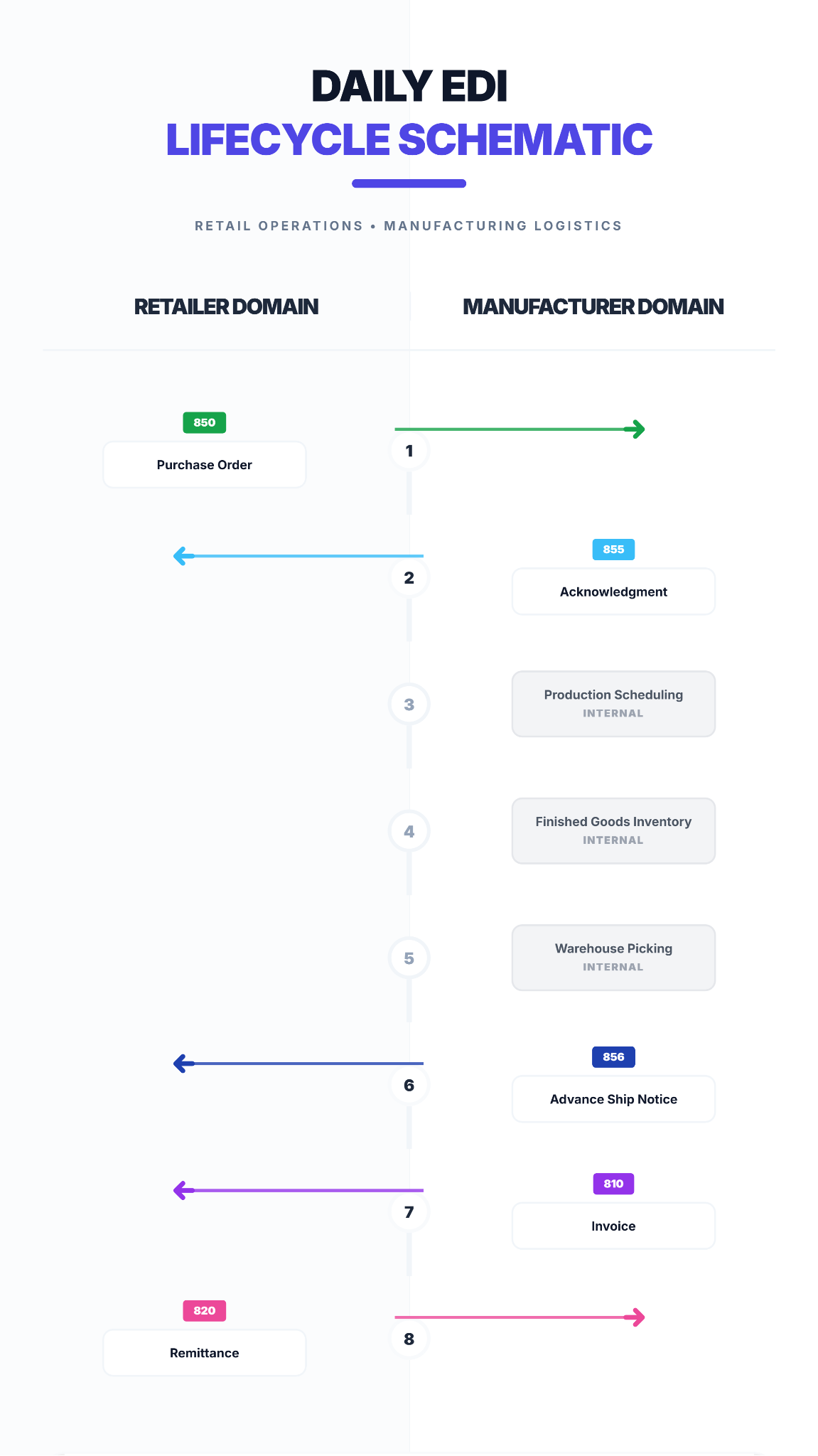
Manufacturing EDI Lifecycle
Manufacturers receive raw POs, plan production, build products, and ship finished goods to retailers and distributors.
Let’s unpack what that means step by step, using common X12 documents.
a. Retailer Sends an EDI 850 Purchase Order
This is where everything starts.
A retailer like AutoZone, Walmart, or a regional distributor realizes it needs more products. The retailer’s system triggers an EDI 850 PO automatically based on inventory or sales.
What the PO includes:
-
- Items needed
- Quantities
- Pricing
- Requested delivery dates
- Shipping location or store DC
- Special instructions (labeling, carton packing, routing guide requirements)
Manufacturers do not want to type this into the ERP manually, so EDI loads the order automatically.
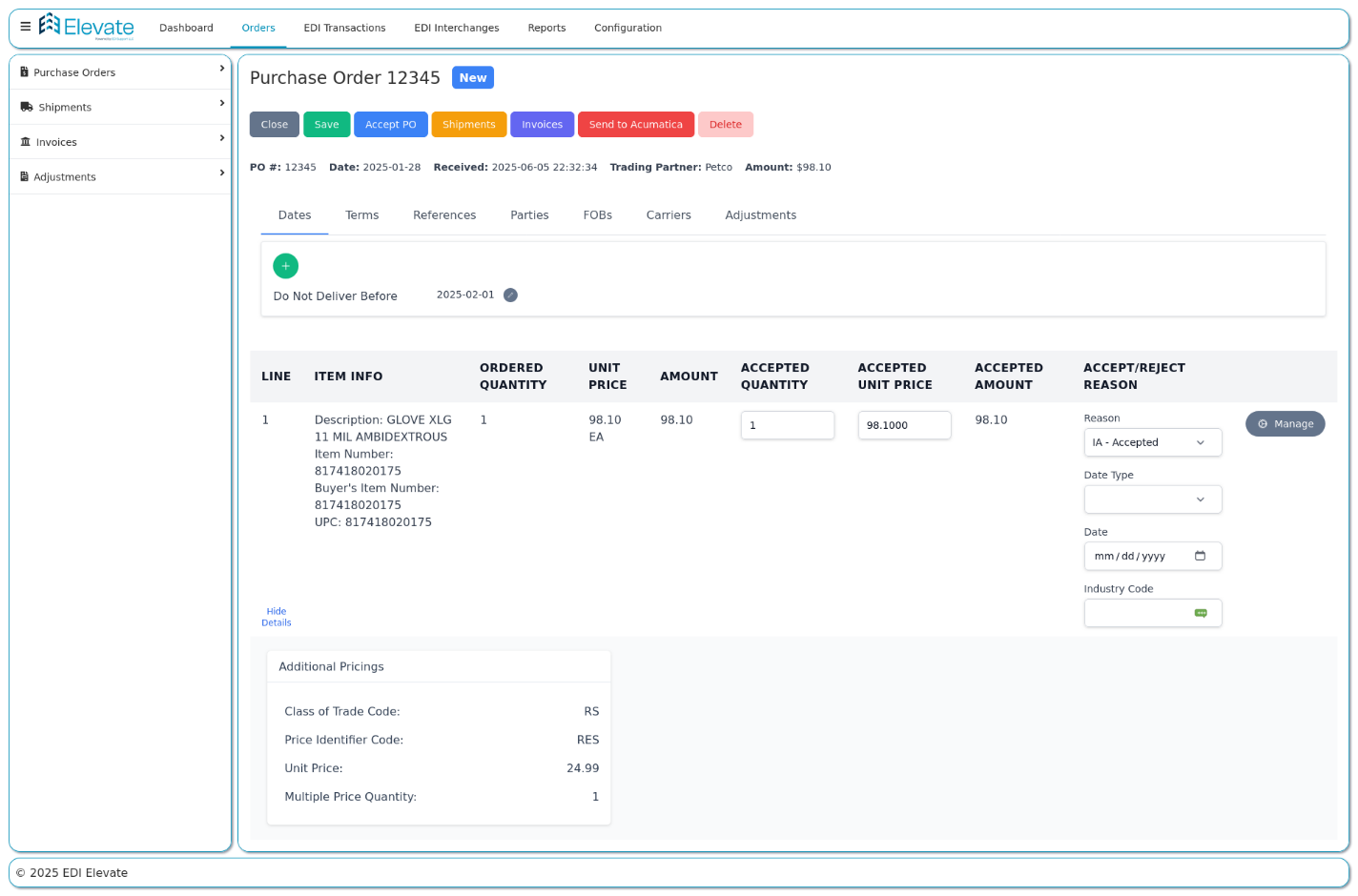
EDI 850 Document in Elevate
b. Manufacturer Confirms What They Can Produce
Once the 850 hits the EDI system, the supplier sends an 855 Purchase Order Acknowledgment.
Three scenarios often happen:
-
- Yes, we can ship it all
- We can ship part of it now
- We need to backorder certain items
This gives the customer immediate visibility into what is realistic instead of waiting for surprises.
Behind the scenes, that approved PO triggers:
-
-
- Bill of materials allocation
- Raw material pull from inventory
- Work orders on the factory floor
- Machine time scheduling
- Labor assignment
- Quality checkpoints
-
This is the part most people forget:
EDI is not just a file.
It kicks off physical production activity.
As production completes, the ERP updates finished goods inventory automatically.
No one needs to notify order entry.
No one re-enters data.
No one hopes the spreadsheet matches reality.
EDI keeps the front of the house (sales orders) aligned with the back of the plant (production).
e. Warehouse Picks, Packs, Labels, and Preps Shipment
Once inventory is ready, the warehouse or distribution center receives a pick ticket.
This comes from the ERP, which was triggered by the EDI PO.
For most large retailers, packing and labeling rules matter even more than the carton contents.
Manufacturers must meet requirements such as:
-
-
-
-
- GS1 labels
- Store-specific pallet breakdowns
- UCC128/GS1-128 labels tied to ASN carton data
- Pack-by-style or pack-by-store instructions
- Serialized or lot-controlled tracking
-
-
-
EDI platforms like Elevate attach that structure directly to the order so nothing gets missed.

GS1-128 Label Template in Elevate
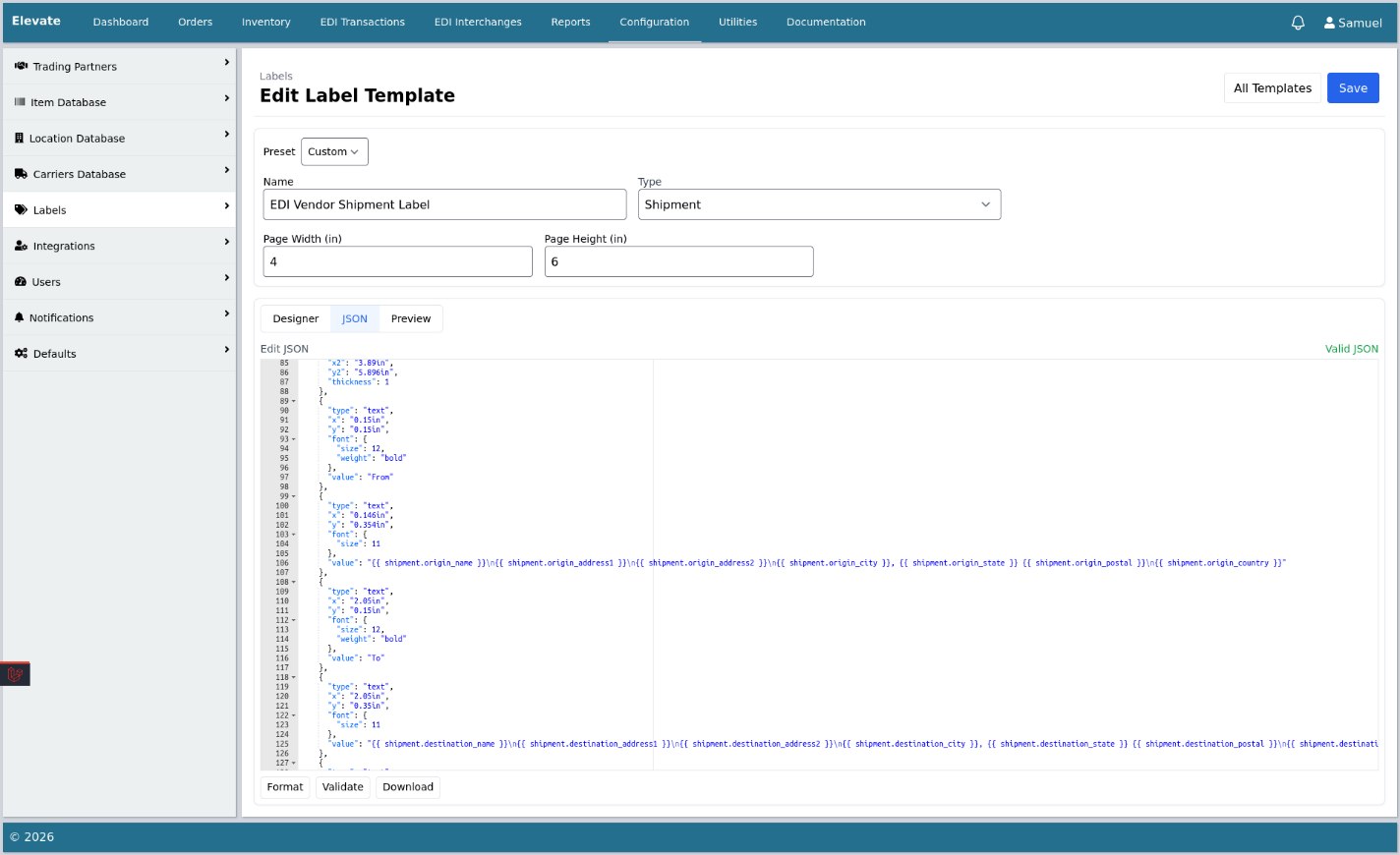
GS1-128 Label Generation in Elevate

GS1-128 Label in Elevate
The 856 ASN tells the retailer exactly what is coming and how it is packed.
It includes:
-
-
-
- Ship date
- Carrier and tracking
- Pallet hierarchy
- Carton numbers
- Inner packs
- Quantities by UPC or SKU
-
-
This document is gold in manufacturing because retailers scan ASNs at receiving.
If the ASN is wrong or missing, pallets sit untouched, the supplier pays storage fees, and chargebacks follow.
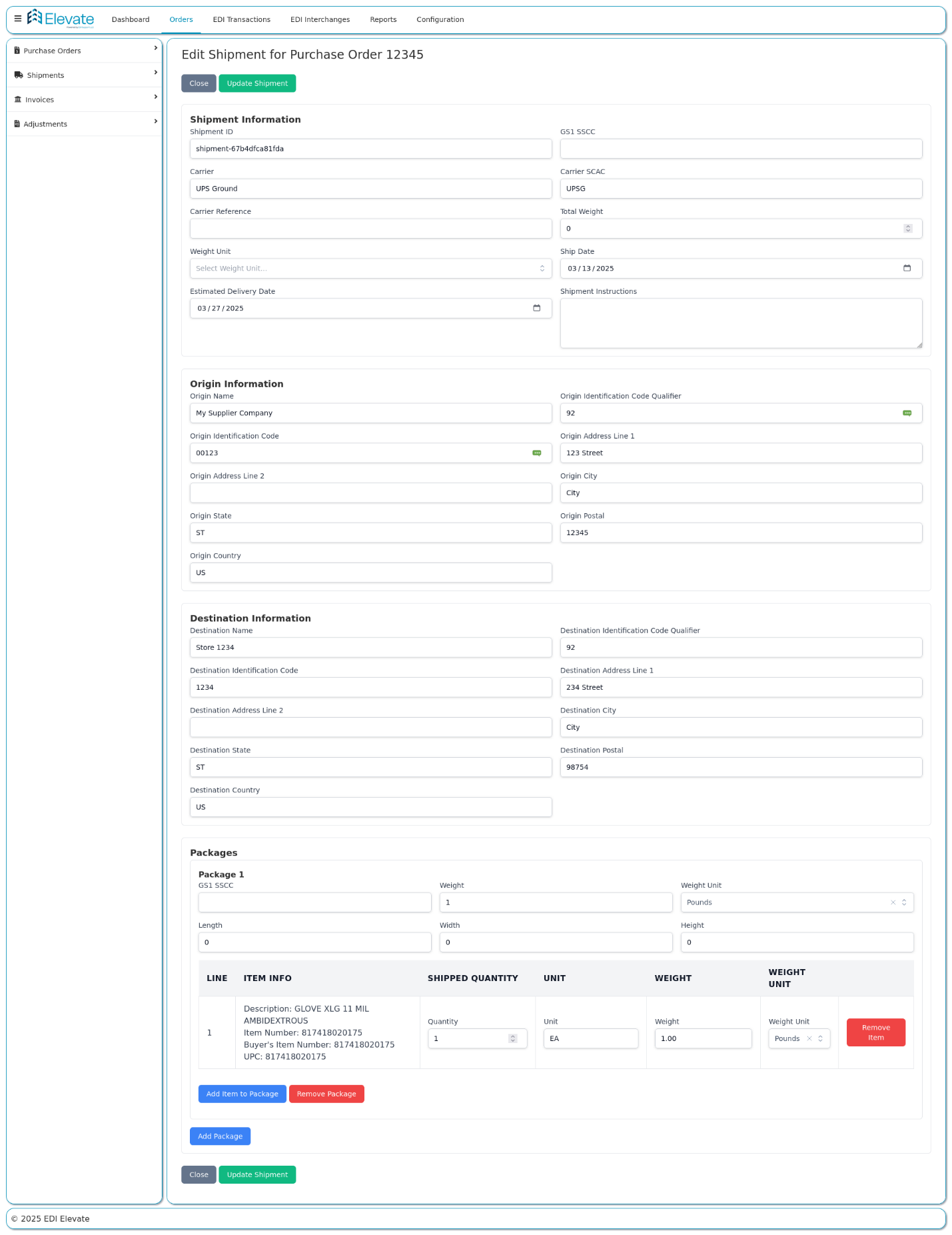
EDI 856 Advance Ship Notice in Elevate
g. The Manufacturer Sends the EDI 810 Invoice
Once goods leave the building, the 810 is generated from the confirmed shipment data.
No need to retype pricing.
No need to calculate totals manually.
Invoice goes out.
Retailers accept it.
Payment cycle begins.
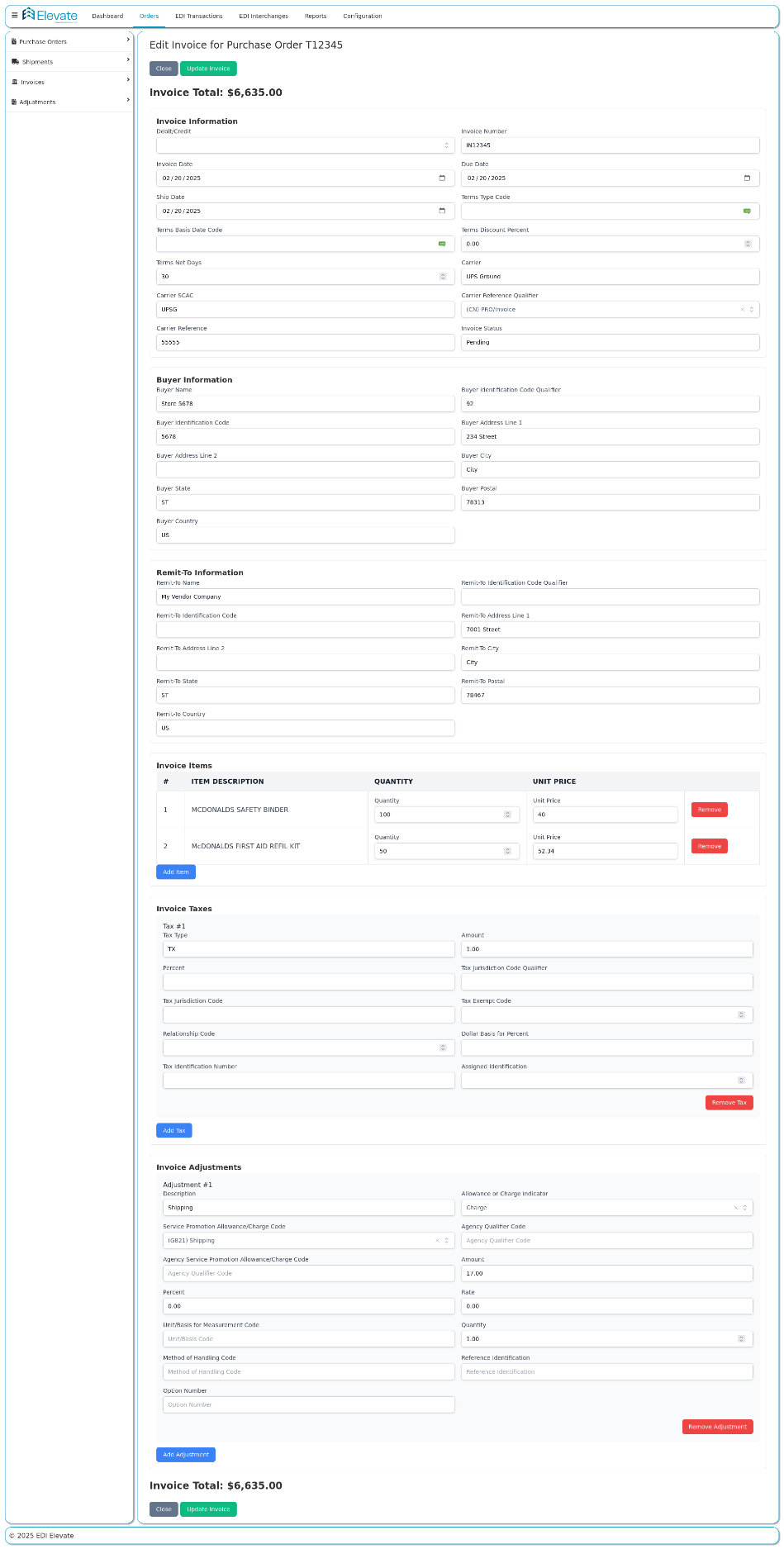
EDI 810 Invoice in Elevate
h. Payment and Scorecarding Come Full Circle
Retailers send the 820 Remittance Advice
-
-
- Here is what we paid
- Here is what we short paid
- Here are deductions or credits
-
The manufacturer reconciles automatically.
At the same time, the retailer tracks:
-
-
- On time delivery
- Fill rates
- ASN accuracy
- Invoice match rates
- Vendor compliance deductions
-
Good EDI execution keeps every metric green.
Manufacturers operate on thin margins and tight timelines.
EDI removes delays in every step:
-
- No waiting for email POs
- No manual data entry
- No miscommunications
- Faster production scheduling
- Better shipping compliance
- Faster invoicing and payment
It is not just technology.
EDI becomes a production-enablement tool.
2. How Distributors Use EDI to Move Product Faster
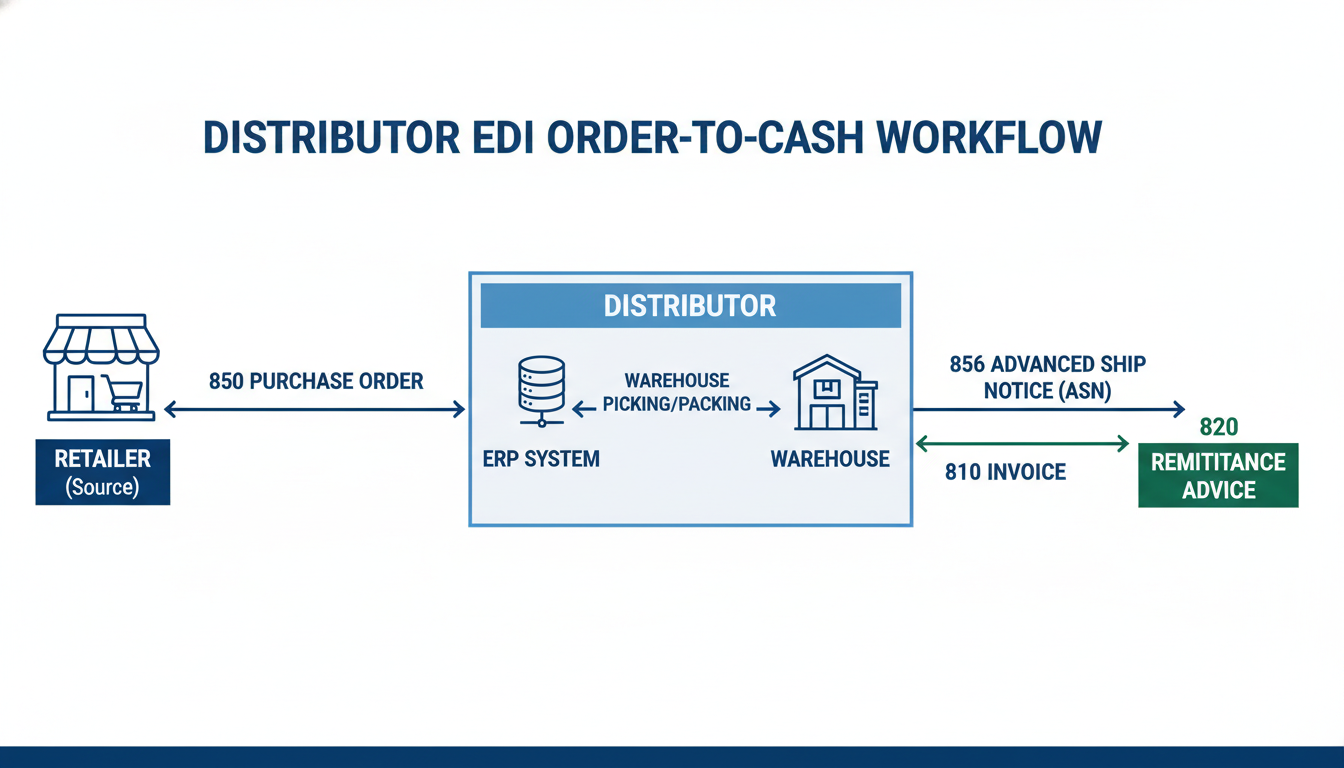
Distributors live between manufacturers and retailers.
Their job is to supply many customers while managing inventory across warehouses, suppliers, and shipping carriers.
Here is how EDI keeps them moving.
Retail chains, independent stores, or online marketplaces place orders. Each retailer sends POs differently.
Without EDI, teams:
-
- Re-enter orders manually
- Compare PDFs to customer rules
- Waste precious time fixing errors
With EDI:
-
- Each 850 flows straight to the ERP
- Item numbers, pricing, and routing rules are pre-mapped
- CSRs stop typing and start problem solving
b. The Distributor Validates and Confirms With an 855
An EDI 855 acknowledgment confirms:
-
-
- What quantities the distributor can fulfill
- Which orders are partial or full
- Estimated ship dates
- Line-item exceptions
-
Buyers love it because they instantly see inventory reality.
Once a PO is accepted, the order flows downstream.
EDI triggers:
-
-
- Pick tickets
- SKU allocations
- Lot or batch tracking
- Pack-slip creation
- DC routing by retailer requirements
-
No one must hand off paperwork or forward emails.
Distributors must meet tight retailer requirements:
-
-
- Correct carton labeling
- Pack-by-store or pack-by-region
- Unique pallet identifiers
-
The 856 ASN tells the retailer everything that is arriving long before the truck backs up to the dock.
Once product ships, the invoice goes directly from ERP to retailer via EDI.
This eliminates:
-
-
- Manual billing delays
- Error-prone totals
- Out-of-sync pricing
-
Fast invoice out equals faster cash in.
EDI 820 remittance tells distributors what was paid.
Retailers may include:
-
-
- Early pay discounts
- Damage deductions
- Chargebacks for noncompliance
-
Good EDI execution protects margins here more than anywhere else.
Why EDI Is Critical for Distributors
Distributors grow when:
-
-
- They onboard more customers
- Volume increases
- Inventory turns improve
-
Those can only happen when EDI keeps the order-to-cash cycle fast and repeatable.
One distributor with 50 trading partners could spend hundreds of hours per month entering orders manually without EDI. No one has time for that.
3. How Retailers Depend on EDI to Keep Their Shelves Full
Retailers rely on EDI to make sure shelves do not sit empty and online shoppers are not disappointed.
Their world is all about timing, forecasting, and receiving accuracy.
a. Retail Systems Trigger Automatic POs
The EDI 850 purchase order is created by:
-
-
- Replenishment logic
- Inventory thresholds
- Seasonal buying cycles
- Promo planning
- Forecasting models
-
These POs automatically go to suppliers, without any human interaction.
Retailers need to know early:
-
-
- Will product arrive on time?
- Are quantities complete?
- What is short or backordered?
- Do we need to substitute SKUs?
-
The EDI 855 document gives visibility into the future, not just the present.
Retail distribution centers rely heavily on ASN.
The 856 ASN provides:
-
-
- Pallet and carton breakdown
- Store-specific pack quantities
- Item numbers and UPCs
- Tracking numbers
- Expected arrival time
-
Without it, unloaded products sit until someone manually counts every case.
That is a recipe for missed selling days.
Retailers use EDI to measure:
-
-
- On time delivery
- Fill rates
- Invoice accuracy
- ASN compliance
- Shipment packaging correctness
-
If the retailer’s DC is automated, a bad ASN can slow an entire receiving line.
Retail accounting relies on clean matching:
-
-
- EDI 850 PO
- EDI 856 ASN
- EDI 810 invoice
-
If something does not match, it becomes a deduction or chargeback. Retailers enforce compliance because it keeps operations smooth.
When a retailer adds 200 stores or launches eCommerce, no one wants to hire more data entry staff.
EDI makes growth possible:
-
-
- No PO typing
- No invoice scanning
- No tracking emails
- No store-level manual reporting
-
4. How 3PL Warehouses Use EDI to Power the Supply Chain
Third party logistics providers fulfill orders on behalf of multiple brands.
They never own the inventory, but they are responsible for moving it accurately.
The EDI 940 tells the warehouse:
-
-
- What items to pick
- Lot or batch numbers when required
- Destination location
- Carrier rules
- Labeling requirements
-
Warehouse teams no longer chase emails or unclear spreadsheets.
Once a shipment is ready:
-
-
- The EDI 945 confirms final quantities
- Any adjustments are captured
- Serial and lot data syncs if needed
-
This keeps inventory accurate in both the supplier ERP and Elevate.
Because 3PLs physically handle the goods, the most accurate data lives with them, not the supplier office.
The warehouse can trigger:
-
-
- EDI 856 ASN
- Tracking details
- Packaging hierarchy
- Packing slips
-
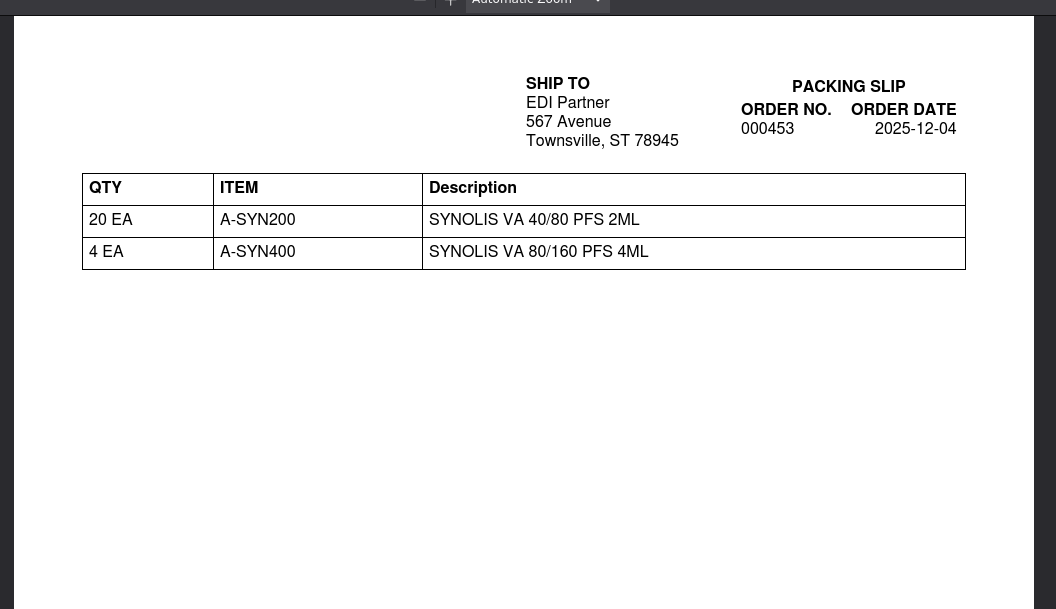
Packing Slips in Elevate
Everything arrives at the retailer before the truck does.
When freight carriers are integrated, 214 shipment status updates feed:
-
-
- ETA
- Delivery confirmation
- Delay alerts
-
Customer service teams stop hunting down tracking numbers.
Warehouses send updates when:
-
-
- Orders are canceled midstream
- Freight is rejected
- Product is returned to stock
- Goods are destroyed or marked unsellable
-
Without this visibility, suppliers sell inventory they do not have.
A warehouse handling 50 clients with paper-based workflows would collapse under the volume.
EDI allows:
-
-
- Automated instructions
- Real-time confirmations
- Inventory accuracy
- Scalable fulfillment
-
3PLs become force multipliers in the supply chain.
The Big Picture
How EDI Keeps the Modern Supply Chain Moving
When EDI is working properly across manufacturers, distributors, retailers, and 3PLs, each company sees only its part of the process, but all of them are contributing to a single, continuous flow of information and product.
Here is what that unified picture looks like end to end.
A shopper scans an item at checkout or clicks “buy now” on a website.
That single transaction can eventually trigger an automated replenishment order.
Retail systems:
-
-
- Reduce store or DC inventory
- Forecast replacement needs
- Create an EDI 850 purchase order without anyone typing a thing
- Push it out to the supplier through EDI
-
This is the first domino.
The EDI 850 lands inside the supplier’s EDI platform and ERP. There is no delay while customer service enters data or checks email.
That automated receipt unlocks:
-
-
- Work order creation
- Material allocation
- Production scheduling
- Warehouse staging
- Customer date promise accuracy
-
This is where EDI becomes a production signal, not just a message.
Once the order is accepted with an 855 and inventory is ready, goods start to move.
Depending on the supply chain:
-
-
- A distributor might pull from stock
- A manufacturer might ship from an onsite DC
- A 3PL might print pick tickets and pack cartons
- A carrier might schedule pickup windows
-
-
-
- 940 pick instructions
- 945 shipping confirmations
- 856 ASNs
- 214 shipment statuses
- Lot, carton, pallet, and tracking data
-
Every time a handoff happens, EDI captures it.
Retail DCs operate at high speed and high volume. They do not want to open random trucks and figure out what is inside.
The ASN 856 gives them advanced visibility into:
-
-
- What is coming
- How it is packed
- What labels to scan
- Which stores or regions need which product
- When the truck will show up
-
This allows retailers to plan labor, receiving lines, and store replenishment without slowing down operations.
Once the product ships, EDI flips from logistics into finance.
The supplier sends an 810 invoice, usually generated automatically from shipped quantities rather than someone typing totals.
The retailer sends an 820 remittance, telling the supplier:
-
-
- What is being paid
- What is short paid
- What deductions apply
- Whether any ASNs or invoices mismatched
-
Clean EDI means fewer deductions, faster reconciliation, and smoother cash flow.
Retailers track supplier reliability closely.
Distributors monitor fill rates and backorders.
3PLs measure throughput and productivity.
Manufacturers track production against demand.
EDI supports every one of these by giving:
-
-
- Real-time supply chain visibility
- Accurate timestamps
- Precise quantities
- Digital audit trails
- Automated alerts when something goes wrong
-
Operational leaders depend on this data to make decisions.
This is the silent benefit of EDI.
When demand rises:
-
-
- More orders flow in
- More shipments go out
- More invoices are issued
- More payments get reconciled
-
With EDI:
-
-
- Systems scale
- Teams stay lean
- Sales growth does not require headcount growth
- Profitability stays intact
-
This is where companies feel the difference most.
8. The Entire Supply Chain Gains Speed, Accuracy, and Stability
Every player benefit:
Manufacturers
-
-
- Plan production confidently
- Know what to build and when
- Reduce stockouts and overruns
-
-
-
- Turn orders faster
- Support more customers
- Reduce mistakes and returns
-
-
-
- Keep shelves stocked
- Reduce receiving delays
- Avoid lost sales
-
-
-
- Fulfill cleanly and consistently
- Sync inventory instantly
- Manage multiple brands at scale
-
-
-
- Data
- Materials
- Inventory
- Shipments
- Payments
- Visibility
-
24 hours a day, 7 days a week.
Where Elevate Fits into All of This
Every example above becomes simpler when the supporting technology handles:
• Partner onboarding
• Mapping translation
• Testing and certification
• 24/7 monitoring
• Exception alerts and resolution
• Integration into ERP or WMS
• Daily operations when volumes grow
With the right fully managed EDI platform built for SMBs like Elevate, teams stop talking about documents entirely. They just see clean orders, shipments, and invoices moving in and out.
Two Real World EDI Stories from Companies Like Yours
Here is how those examples play out in the real world.
1. Case Study: US Motor Works
Before EDI Support LLC:
US Motor Works relied on its incumbent EDI provider for years, but as order volume grew and new partners came online, their team kept running into roadblocks.
They struggled with:
• An unresponsive provider that moved too slowly
• No usable path for multiple file formats
• Technology that wasn’t evolving or innovating
• Inability to support XML traffic from OSC Cooling’s ERP
• Lack of ERP integration support for Sage 100
• Expanding partner requirements that demanded flexibility and speed
What they needed was not just a new tool, but a partner with the experience and responsiveness to cleanly integrate EDI across two ERP environments during an acquisition.
What EDI Support LLC Delivered:
EDI Support partnered with US Motor Works and their Sage 100 consultant to build a flexible, scalable EDI environment that could support current operations and future growth.
We helped by:
-
-
- Choosing the right combination of OpenText ECS/Delta and SPS Mapadoc to handle communication, mapping, and Sage 100 integration.
- Supporting OSC Cooling’s XML-based orders while transitioning those trading partners into Sage 100 with zero downtime.
- Turning around new maps, formats, and trading partner setups quickly without delays.
- Providing training and visibility so the US Motor Works team could understand and manage parts of the process independently.
- Instead of forcing US Motor Works into rigid workflows, the new system gave them the flexibility, control, and responsiveness their business required.
-
2. Case Study: PortCity
Before EDI Support LLC
PortCity had outgrown its EDI environment. Multiple systems layered over the years created a patchwork of tools and integrations that were expensive to maintain and slow to adapt.
They wanted:
• A single integration framework
• Faster trading partner onboarding
• Control of their EDI workflows
• Less dependence on vendors and proprietary platforms
• A system their internal team could understand and manage
Attempts to patch the problem with custom API developers only added more complexity. Boomi offered the flexibility they needed, but they needed a partner with both EDI and Boomi expertise to do it right.
What EDI Support LLC Delivered
EDI Support stepped in to architect and implement a clean, sustainable Boomi EDI integration strategy.
• Replaced legacy EDI with Boomi-driven integrations
• Built transformation workflows for existing partners
• Helped onboard new trading partners in parallel
• Standardized folder and process structure for clarity
• Guided PortCity toward internal ownership instead of permanent outsourcing
• Stayed aligned across time zones for rapid response
Behind the scenes, EDI Support handled core technical execution. PortCity remained free to focus on partner relationships, internal priorities, and business strategy.
Every implementation and update was tracked through formal project codes, giving PortCity visibility and predictability as needs evolved.
Results and Impact
PortCity now runs a leaner, smarter integration operation on Boomi and has taken true ownership of its digital ecosystem.
They achieved:
• Seamless migration from their incumbent EDI system
• Faster trading partner onboarding with no downtime
• The ability to manage integrations themselves
• Lower long-term cost and complexity
• One centralized integration strategy across TMS and WMS platforms
• Transparent workflows and simpler day-to-day management
• Responsive support without timezone delays
Final Takeaway
EDI is not just a technology layer or a set of transaction codes. It is the quiet engine that keeps the modern supply chain running. When manufacturers, distributors, retailers, and 3PLs exchange clean, automated data, orders get built faster, inventory stays accurate, shipments move on time, invoices match, and companies grow without adding chaos or headcount. The businesses that embrace EDI as a strategic advantage, rather than a check-the-box requirement, unlock speed, resilience, and control across their entire operation.
FAQs
1. What is EDI in simple terms?
EDI, or Electronic Data Interchange, is the automated exchange of business documents between companies.
Instead of emailing PDFs or typing orders manually, systems send standardized data to each other electronically.
2. What are the most common EDI documents?
The top four that most companies rely on daily are:
• 850 Purchase Order
• 855 Purchase Order Acknowledgment
• 856 Advance Ship Notice
• 810 Invoice
These documents cover ordering, confirmation, shipping, and billing, the core of most supply chains.
3. Who uses EDI?
Companies across the supply chain use EDI, including:
• Manufacturers
• Distributors
• Retailers
• 3PL warehouses
• Transportation carriers
• Brands selling through big-box retail
• Suppliers onboarding to marketplaces
If a business buys, sells, or ships products, EDI matters.
4. Why do companies use EDI instead of email or PDFs?
Because manual data entry slows everything down, causes mistakes, and doesn’t scale.
EDI:
• Eliminates manual typing
• Reduces errors
• Speeds up order processing
• Improves accuracy and compliance
• Keeps systems synchronized
5. How does EDI work?
One system generates a document (like an 850 PO).
It gets translated into a standard format and sent electronically to the partner’s system.
Their system reads it, processes it, and responds with the next document in the workflow (like an 855 or 856).
No human intervention unless there’s an exception.
6. What are real examples of EDI in action?
A few common workflows:
• A retailer sends a purchase order to a supplier
• A distributor acknowledges quantities available
• A warehouse picks and ships and sends an ASN
• A supplier invoices automatically after goods leave the dock
7. Does EDI work only with X12 files?
No.
X12 is just one standard used in North America.
Today’s EDI often supports:
• EDIFACT
• XML
• JSON
• Flat files
• API-driven messaging
Many modern supply chains run a blend of formats.
8. Is EDI only for large companies?
No. Retail requirements have driven EDI downstream to small and mid-sized suppliers, distributors, and 3PLs. Companies of all sizes use EDI because it removes manual workloads and helps them grow without adding headcount. If you are just starting out, choose a cloud-based EDI platform that is flexible, affordable and transparent with human support like Elevate. Elevate is fully managed by the EDI Support LLC team for you.
9. What systems does EDI typically connect to?
Most commonly:
• ERP systems (Sage, NetSuite, Acumatica, SAP, Oracle)
• Warehouse management systems (WMS)
• Transportation systems (TMS)
• 3PL platforms
• eCommerce marketplaces
• Customer portals
EDI’s job is to keep all these environments speaking the same language. However, you need a partner like EDI Support LLC that works with your ERP consultant(s) that have set up your above systems to help connect both EDI and your other system.
10. What happens if an EDI document fails?
EDI systems monitor exceptions automatically. Users get alerts when:
• A document rejects
• A partner rejects a file
• Required fields are missing
• A communication link fails
Exception handling keeps orders moving without guesswork. In Elevate, you get notifications in your email in case an EDI document fails. This is called proactive error monitoring that is done by our team to help you stay on top of things.
11. How long does it take to onboard a trading partner?
With the right EDI platform and support team like Elevate, your trading partners can go live in:
- 2–3 weeks for simple onboarding
- Under 2 weeks when requirements are known
- Longer maybe between 6-8 weeks when there are multiple trading partners and complex ERP integration involved
Under legacy systems, onboarding could take months.
12. What is the business impact of using EDI?
Companies see:
• Faster purchasing cycles
• On-time shipments
• Lower labor costs
• Better visibility
• Fewer chargebacks
• Faster cash collection
• Reduction in errors
In short: EDI turns operational chaos into predictable workflows.
13. What is the biggest benefit of EDI?
Speed + accuracy. Once data moves system-to-system automatically, companies scale without hiring armies of people to enter, chase, fix, or reconcile orders.
14. What is the future of EDI?
EDI has evolved into:
• Hybrid API + EDI workflows
• Real-time data sync
• Cloud-connected supply chains
• Support for nontraditional formats
• Increase in AI automation in mapping and exception intelligence
But the core idea of exchanging business data electronically is here to stay.
Table of Content
Read next
Learn the steps required to send EDI documents to your trading partners.
Continue Reading

Inside an EDI Document
An EDI document, or transaction, is made up or comprised of small pieces of information like EDI Envelope, Segments and Data elements gathered into a standardized format.

Step by Step Guide for Small EDI Teams
Learn how to successfully implement EDI step by step if you are a small team or business with limited to no EDI knowledge.

How to Budget for an EDI Implementation
If you are new to EDI, this article will help you budget for your EDI implementation project step by step and get a free EDI cost estimate too.