
EDI 945 Definition
The EDI 945 transaction set is an electronic Warehouse Shipping Advice that is used by the warehouse to inform a supplier that a shipment has been sent to the destination. The supplier will respond to the Warehouse Shipping Advice with an EDI 997 Functional Acknowledgment to indicate that the EDI transaction Warehouse Shipping Advice was received.
Sent By: Warehouse or 3PL with context on when/why they send it (after pick, pack, and ship)
Received By: Supplier, Manufacturer, or Distributor with context on what they do with it (update records, notify customers, generate 810 invoice)
What EDI 945 Represents in Real Life
EDI 945 is not just a shipping notification. It is the operational confirmation that a product has left the warehouse and is on its way to the customer. Without it, suppliers are blind to whether their inventory actually moved.
When an EDI 945 is processed successfully:
-
-
- The supplier knows exactly what was shipped, when, and how
- Inventory records are updated automatically
- The supplier can generate EDI 810 invoice with confidence
- Customer service can proactively communicate delivery timelines
-
In short, the EDI 945 bridges the gap between warehouse operations and supplier visibility.
EDI 945 Specification
This X12 Transaction Set contains the format and establishes the data contents of the Warehouse Shipping Advice Transaction Set (945) for use within the context of an Electronic Data Interchange (EDI) environment. The transaction set can be used to provide for customary and established business and industry practice relative to advising a supplier that a shipment has been made from a warehouse.
Source: Accredited Standards Committee X12. ASC X12 Standard [Table Data]. Data Interchange Standards Association, Inc., Falls Church, VA. https://x12.org
Components of EDI 945 Warehouse Shipping Advice:
Each EDI 945 Warehouse Shipping Advice document contains segments and data elements. Each segment contains at least one data element. Each data element is a data field. Examples of data elements are:
-
-
- Supplier information
- Shipment delivery date
- Ship from and ship to locations
- Carrier used and transportation method
- Payment type
- Item numbers, descriptions, and quantities shipped
-
Additional data that may be included in the shipping advice pertains to:
-
-
- Warehouse location and identification
- Tracking and reference numbers
- Weight and package count
- Special handling instructions
- Lot numbers or serial numbers
-
Related EDI Transactions
Other EDI documents commonly associated with warehouse operations include:
Other related EDI documents include:
-
-
- EDI 810 Invoice
- EDI 812 Credit / Debit Adjustment
- EDI 820 Payment or Order Remittance
- EDI 830 Planning Schedule with Release Capability
- EDI 832 Price/Sales Catalog
- EDI 846 Inventory Inquiry
- EDI 850 Purchase Order
- EDI 855 Purchase Order Acknowledgment
- EDI 856 Advance Ship Notice
- EDI 860 Order Change Request
- EDI 867 Product Transfer and Resale Report
- EDI 870 Order Status Report
- EDI 875 Grocery Products Purchase Order
- EDI 990 Response to a Load Tender
- EDI 997 Functional Acknowledgement
- EDI 204 Motor Carrier Load Tender
- EDI 210 Motor Carrier Freight Details and Invoice
- EDI 214 Transportation Carrier Shipment Status Message
-
EDI 945 Sample File Format (Raw EDI File)
ISA*00* *00* *12*111111111 *12*222222222 *230623*1642*U*00401*000035776*0*P*>~GS*SW*111111111*222222222*20230523*1642*515673*X*004010~ST*945*515673001~W06*F*0541883*20230523*736252*736252*6374333375~N1*SF*Test Corporation~N1*ST*Test Store*92*D002~N3*1234 Main St~N4*AUSTIN*TX*78739~N9*BM*736252~N9*CN*953210823464~G62*11*20230523~W27*M*FDEG*FEDEX GROUND*TP~LX*1~MAN*GM*00008405953001394432**CP*953210823464~W12*CC*1*1*0*EA*123456789012*VN*123456~N9*LI*001~W03*1*7*LB~SE*16*515673001~GE*1*515673~IEA*1*000035776~
What Each Line in EDI 945 Sample Means
Each segment in EDI 945 serves a specific purpose. Here is a breakdown of the sample file above:
ISA – Interchange Control Header. Opens the EDI envelope. Contains the sender ID (111111111), receiver ID (222222222), date (230623), time (1642), control number, and standards version (00401).
GS – Functional Group Header. Identifies the type of transaction (SW = Warehouse Shipping Advice) and groups one or more 945 transactions together.
ST – Transaction Set Header. Marks the beginning of the 945 transaction. The “945” identifies the document type and “515673001” is the unique transaction set control number.
W06 – Warehouse Shipping Order Identification. Contains the shipment status (F = Full shipment), warehouse receipt number, shipment date (20230523), depositor order number, and shipment ID.
N1*SF – Ship From Name. Identifies the party shipping the goods (SF = Ship From). In this case, “Test Corporation” is the shipper.
N1*ST – Ship To Name. Identifies the destination (ST = Ship To). “Test Store” with identification code qualifier 92 and code D002.
N3 / N4 – Address Information. N3 contains the street address (1234 Main St) and N4 contains the city (Austin), state (TX), and ZIP code (78739).
N9*BM / N9*CN – Reference Identification. BM = Bill of Lading number (736252). CN = Carrier’s reference or tracking number (953210823464).
G62 – Date/Time. Qualifier 11 indicates the shipped date. The shipment was sent on 20230523 (May 23, 2023).
W27 – Carrier Detail. Transportation method (M = Motor), carrier code (FDEG), carrier name (FedEx Ground), and payment method (TP = Third Party).
LX – Assigned Number. A line counter that identifies each detail loop. LX*1 means this is the first (and only) detail line in this shipment.
MAN – Marks and Numbers. GM = SSCC-18 barcode. Contains the shipping container code (00008405953001394432) and carrier package tracking number (953210823464).
W12 – Warehouse Item Detail. The core line item segment. Contains shipment type (CC = Shipped complete), quantity shipped (1), quantity ordered (1), damage quantity (0), unit of measure (EA = Each), UPC code (123456789012), and vendor part number (123456).
N9*LI – Line Item Reference. LI = Line Item Number. References line 001 of the original order.
W03 – Total Shipping Order. Summary of the shipment: 1 total package, weighing 7 LB (pounds).
SE – Transaction Set Trailer. Closes the 945 transaction. Contains the segment count (16 segments) and the matching control number from the ST segment.
GE – Functional Group Trailer. Closes the functional group. Indicates 1 transaction set was included in this group.
IEA – Interchange Control Trailer. Closes the entire EDI envelope. Confirms 1 functional group and the matching interchange control number from the ISA segment.
What an EDI 945 Looks Like Inside Elevate
Although the raw EDI 945 is machine-readable, our cloud-based EDI platform Elevate presents the shipping advice in a clean, readable format for business users.
Inside Elevate, teams can see:
-
-
- Shipment date and delivery details
- Related purchase order number
- Ship from and ship to addresses
- Carrier and tracking information
- Line items, quantities, and item descriptions
- Status of processing and acknowledgment
-
This visibility helps operations, logistics, and customer service teams troubleshoot shipping issues quickly without reading raw EDI.
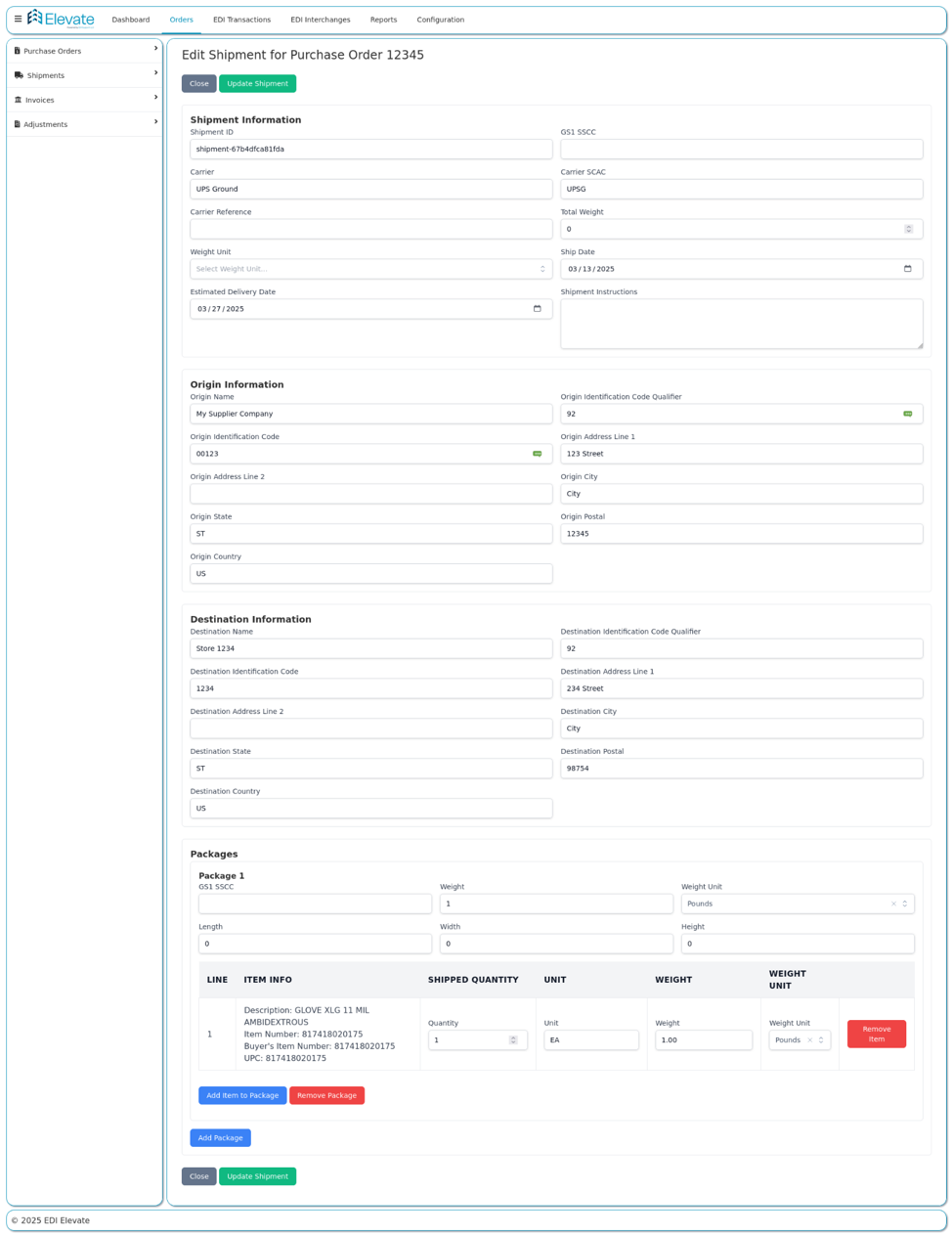
EDI 945 Warehouse Shipping Advice in Elevate
How to Start Sending EDI 945 Warehouse Shipping Advice
- Understand your trading partner’s requirements: Each trading partner will have a specific EDI implementation guide that outlines the segments, data elements, and codes they expect in the 945. Review this guide carefully before mapping.
- Choose an EDI platform: You need EDI software to translate your warehouse or WMS data into the ANSI X12 945 format. Cloud-based platforms like Elevate make this straightforward with transparent pricing, no contracts, and end-to-end support.
- Map your data: Connect the fields in your WMS or ERP to the corresponding EDI 945 segments. This includes shipment details, carrier information, item quantities, tracking numbers, and addresses.
- Test with your trading partner: Before going live, send a test 945 transaction to your trading partner to validate that the data maps correctly and meets their requirements. Most partners require a testing phase before production.
- Go live and monitor: Once testing is complete, begin sending production 945s. Monitor for errors, acknowledgment failures (997s), and data mismatches. A good EDI platform will alert you to issues in real time.
Need help with EDI 945 implementation and more?
Elevate is built for small businesses and includes hands-on onboarding so you don’t have to figure it out alone.
Real-World Example: Warehouse Fulfilling an Order
A retailer places an order for 500 units from a supplier who uses a third-party warehouse.
-
-
- The supplier sends an EDI 940 Warehouse Shipping Order to the warehouse
- The warehouse picks, packs, and ships the order
- The warehouse sends an EDI 945 back to the supplier with shipment details
- Elevate validates the shipment data and updates inventory
- The supplier generates an EDI 810 invoice based on actual shipped quantities
- The retailer receives the ASN and invoice electronically
- Payment is scheduled without manual reconciliation
-
When 945 is accurate, the rest of the supply chain flows without friction.
Why EDI 945 Accuracy is Critical
Warehouse shipping errors create downstream problems across the entire supply chain.
Common problems include:
-
-
- Quantity mismatches between what was ordered and what was shipped
- Incorrect carrier or tracking information
- Wrong ship-to addresses
- Missing item details or reference numbers
-
These issues lead to:
-
-
- Invoice disputes and payment delays
- Chargebacks from trading partners
- Inventory discrepancies
- Manual follow-up and reconciliation work
- Damaged retailer relationships
-
A clean EDI 945 keeps fulfillment, invoicing, and payment on track.
Common Challenges with EDI 945 Warehouse Shipping Advice
-
-
- Different trading partners require different 945 formats and field mappings
- Partial shipments require multiple 945s tied to a single order
- Multi-warehouse fulfillment creates complexity in tracking and consolidation
- Carrier codes and service levels vary across logistics providers
- ERP or WMS migrations can break existing 945 mappings
-
Flexible EDI systems handle these scenarios without breaking the flow.
FAQs
1. What is the difference between an EDI 945 and EDI 856?
The EDI 945 is sent from the warehouse to the supplier to confirm a shipment was made. The EDI 856 (Advance Ship Notice) is sent from the supplier to the customer to notify them that a shipment is on its way. The 945 is warehouse-to-supplier, while the 856 is supplier-to-customer.
2. What is the difference between an EDI 945 and EDI 940?
The EDI 940 is a Warehouse Shipping Order sent from the supplier to the warehouse, instructing the warehouse to ship goods. The EDI 945 is the warehouse’s response, confirming that the shipment was completed. Think of the 940 as the request and the 945 as the confirmation.
3. Who sends EDI 945?
The warehouse or third-party logistics provider (3PL) sends the EDI 945 to the supplier, manufacturer, or distributor after a shipment has been picked, packed, and shipped.
4. Is EDI 945 required?
It depends on the trading partner relationship. If a supplier uses a third-party warehouse or 3PL, the 945 is typically a required part of the EDI workflow. Without it, the supplier has no automated way to know that goods have shipped.
5. What happens after an EDI 945 is sent?
The supplier receives the 945, responds with an EDI 997 Functional Acknowledgment, and then typically generates an EDI 856 (Advance Ship Notice) for the customer and an EDI 810 (Invoice) for billing.
6. Can I send EDI 945 without a VAN?
Traditionally, EDI documents are exchanged through a Value Added Network (VAN). However, modern cloud-based EDI platforms like Elevate can handle EDI transmission directly, simplifying the process and reducing costs for small businesses.
7. What EDI version does 945 use?
The EDI 945 follows the ANSI X12 standard. The most commonly used versions are 4010 and 5010, though the specific version depends on your trading partner’s requirements.