
EDI 875 Definition
The EDI 875 transaction set is an electronic Grocery Products Purchase Order used by grocery wholesalers and retailers to place orders for finished goods from a supplier. The EDI 875 and EDI 850 Purchase Order are similar in nature; however, EDI 875 was specifically designated for grocery EDI transactions by X12.
Sent By: Retailer, Wholesaler, or Buyer
The grocery retailer or wholesaler sends EDI 875 to the supplier when placing an order for grocery products. This is the grocery industry’s equivalent of an EDI 850 Purchase Order.
Received By: Supplier, Manufacturer, or Distributor
The supplier receives EDI 875 as a request to fulfill a grocery product order. Upon receipt, the supplier sends an EDI 997 Functional Acknowledgment and begins processing the order for shipment.
What EDI 875 Represents in Real Life
EDI 875 is not just a purchase order. It is the starting point of the grocery supply chain transaction when a retailer commits to buying product from a supplier. Without it, there is no order to fulfill, no shipment to send, and no invoice to generate.
When an EDI 875 is processed successfully:
-
-
- The supplier knows exactly what the retailer wants, in what quantities, and when
- Warehouse fulfillment can begin immediately
- The supplier can plan production and inventory allocation
- The entire downstream flow: shipment, invoice, payment is set in motion
-
In short, EDI 875 is how grocery retailers tell suppliers what to ship.
EDI 875 Specification
This X12 Transaction Set contains the format and establishes the data contents of the Grocery Products Purchase Order Transaction Set (875) for use within the context of an Electronic Data Interchange (EDI) environment. The transaction set can be used to provide for customary and established business and industry practice relative to the placement of purchase orders for grocery products.
Source: Accredited Standards Committee X12. ASC X12 Standard [Table Data]. Data Interchange Standards Association, Inc., Falls Church, VA. https://x12.org
Components of an EDI 875 Grocery Products Purchase Order:
Each EDI 875 document contains segments and data elements. Examples of data elements are:
-
-
- Purchase order number and date
- Item descriptions
- Line item numbers
- Item quantities
- Item prices and total cost
- Discounts, if any
- Total order cost
- Shipping instructions
- Vendor number
-
Additional data that may be included:
-
-
- Ship to, bill to, and vendor addresses
- Contact information
- Delivery dates and pickup instructions
- UPC codes and pack sizes
- Carrier and transportation method
- Free-form notes and special instructions
-
Related EDI Transactions
Other EDI documents that are similar to Grocery Products Purchase Order:
-
-
- EDI 850 – Purchase Order (general-purpose order used across industries)
- EDI 876 – Grocery Products Purchase Order Change
-
Other related EDI documents include:
-
-
- EDI 810 – Invoice
- EDI 812 – Credit / Debit Adjustment
- EDI 820 – Payment or Order Remittance
- EDI 830 – Planning Schedule with Release Capability
- EDI 832 – Price/Sales Catalog
- EDI 846 – Inventory Inquiry
- EDI 855 – Purchase Order Acknowledgment
- EDI 856 – Advance Ship Notice
- EDI 860 – Order Change Request
- EDI 867 – Product Transfer and Resale Report
- EDI 870 – Order Status Report
- EDI 880 – Grocery Products Invoice
- EDI 990 – Response to a Load Tender
- EDI 997 – Functional Acknowledgement
-
All edi documents need to be linked as in this doc.
EDI 875 Sample File Format (Raw EDI File)
ISA*00*          *00*          *12*111111111      *12*222222222      *230621*1710*U*00401*000000061*0*P*>
GS*OG*111111111*222222222*20230621*1710*13*T*004010UCS
ST*875*0001
G50*N*20220621*708398
G61*BD*DANIEL BEARMAN*TE*5083133531
G62*02*20220705
NTE*GEN*DOCUMENTPICK-UP NO.0TO SCHEDULE AN APPOINTMENT PLEASE LOG ONTO ONE NETWORK. IF
NTE*GEN*YOU NEED ASSISTANCESCHEDULING OR DIRECTIONS TO DISTRIBUTION
G66*PP*M**01*TRUCK
N1*ST*Test Store*9*00111111111
N2*Grocery
N3*123 Carrot Rd
N4*Wells*ME*04090
N1*BT*Corporate*9*1234567890123
N2*Corporate Center
N3*BOX 29093
N4*PHOENIX*AZ*85038
N1*VN*John Doe*9*9999999990000
N3*123 EDI Rd
N4*DOLYESTOWN*PA*18901
G68*30*CA*54.54*123456789012*PI*8888888
G69*Item 1
G70*********030005
G68*60*CA*58.44*123456789011*PI*9999999
G69*Item 2
G70*********030005
G76*90*CA*4399*LB
SE*26*0001
GE*1*13
IEA*1*000000061
What Each Line in the EDI 875 Sample Means
Each segment in an EDI 875 serves a specific purpose. Here is a breakdown of the sample file above:
ISA – Interchange Control Header. Opens the EDI envelope. Contains sender ID, receiver ID, date (230621), time (1710), control number, and standards version (00401).
GS – Functional Group Header. Identifies the transaction type (OG = Grocery Products Purchase Order) and uses 004010UCS, the grocery-specific UCS version.
ST – Transaction Set Header. Marks the beginning of the 875 transaction. “875” identifies the document type.
G50 – Purchase Order Identification. Contains order status (N = New), order date (20220621), and purchase order number (708398).
G61 – Contact Information. BD = Buying Division contact. Provides name (Daniel Bearman) and phone number (5083133531).
G62 – Delivery Date. Qualifier 02 = Delivery Requested date. The retailer wants delivery by 20220705 (July 5, 2022).
NTE – Note/Special Instruction. GEN = General note. Contains free-form text about pickup scheduling and appointment instructions.
G66 – Transportation Instructions. Payment method (PP = Prepaid), transportation method (M = Motor), equipment number (01), and equipment type (TRUCK).
N1*ST – Ship To Name. Identifies the delivery destination (ST = Ship To). “Test Store” with DUNS code 00111111111.
N2 / N3 / N4 (Ship To) – Ship To Address. N2 is an additional name line (Grocery), N3 is the street (123 Carrot Rd), and N4 is city (Wells), state (ME), ZIP (04090).
N1*BT – Bill To Name. Identifies the billing party (BT = Bill To). “Corporate” with DUNS code 1234567890123.
N1*VN – Vendor Name. Identifies the supplier (VN = Vendor). “John Doe” with DUNS code 9999999990000.
G68 – Line Item Detail. The core grocery line item segment. Contains quantity (30 or 60), unit of measure (CA = Case), unit price ($54.54 or $58.44), UPC code, and pack indicator/item code (PI).
G69 – Line Item Description. Free-form text describing the item (e.g., “Item 1”, “Item 2”).
G70 – Line Item Detail – Miscellaneous. Contains additional item-level data such as pack size information (030005).
G76 – Total Purchase Order. Summary: 90 total cases (CA) weighing 4,399 LB (pounds).
SE – Transaction Set Trailer. Closes the 875. Contains the segment count (26) and matching control number.
GE – Functional Group Trailer. Closes the functional group. 1 transaction set included.
IEA – Interchange Control Trailer. Closes the EDI envelope. Confirms 1 functional group.
What an EDI 875 Looks Like Inside Elevate
Although the raw EDI 875 is machine-readable, our cloud-based EDI platform Elevate presents the grocery purchase order in a clean, readable format for business users.
Inside Elevate, teams can see:
-
-
- Purchase order number and date
- Ship to, bill to, and vendor details
- Delivery date and pickup instructions
- Carrier and transportation method
- Line items, quantities, case counts, and pricing
- Total order amount and weight
- Status of processing and acknowledgment
-
This visibility helps teams troubleshoot grocery purchase order issues quickly without reading raw EDI.
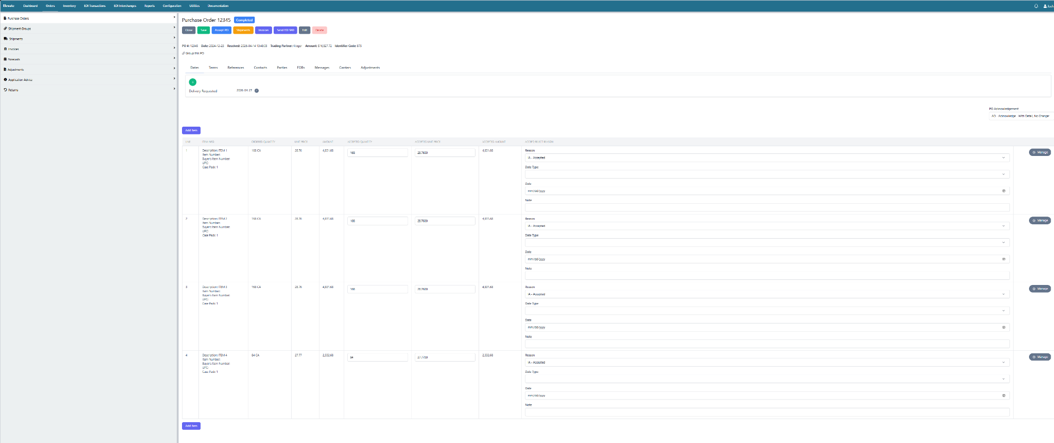
EDI 875 Grocery Purchase Order in Elevate
How to Start Receiving EDI 875
If your business supplies grocery products and needs to start receiving EDI 875 purchase orders from retailers, here is a general roadmap:
- Understand your retailer’s requirements: Each grocery retailer will have a specific EDI implementation guide that outlines the segments, data elements, and codes they use in the 875. Review this guide carefully before mapping.
- Choose an EDI platform: You need EDI software to translate your data into the proper ANSI X12 format. Cloud-based platforms like Elevate make this straightforward with transparent pricing, no contracts, and end-to-end support.
- Map the data to your system: Connect the incoming 875 segments to the corresponding fields in your ERP or order management system. This includes order details, item quantities, pricing, ship-to addresses, and delivery dates.
- Test with your retailer: Before going live, have your retailer send test 875 transactions so you can validate that the data maps correctly and your system processes it as expected.
- Go live and monitor: Once testing is complete, begin receiving production 875s. Monitor for errors, missing acknowledgments, and order discrepancies. A good EDI platform will alert you to issues in real time.
Need help with EDI 875 implementation and more?
Elevate handles every step from trading partner setup to ERP connection to ongoing invoice monitoring. No IT team required.
Real-World Example: Retailer Ordering from a Grocery Supplier
A grocery chain orders 90 cases across two products from a food supplier.
-
-
- The retailer sends an EDI 875 Grocery Products Purchase Order to the supplier
- Elevate receives and validates the order automatically
- The supplier confirms receipt with an EDI 997
- The supplier picks, packs, and ships the order
- An EDI 856 Advance Ship Notice is sent to the retailer
- The supplier sends an EDI 880 Grocery Products Invoice
- The retailer matches the invoice to the PO and schedules payment
-
When the 875 is processed cleanly, the entire order-to-payment cycle runs without manual intervention.
Why EDI 875 Accuracy is Critical
Purchase order errors at the start of the process cascade through every step that follows.
Common problems include:
-
-
- Wrong item quantities or UPC codes
- Incorrect delivery dates
- Missing vendor or ship-to information
- Wrong pricing against the catalog
-
These issues lead to:
-
-
- Wrong product shipped
- Missed delivery windows
- Invoice mismatches and payment delays
- Chargebacks and deductions
- Manual rework on both sides
-
A clean EDI 875 sets the entire transaction up for success.
Common Challenges with EDI 875 Grocery Products Purchase Orders
Different grocery retailers use different 875 formats and UCS versions
-
-
- Promotional pricing and deal codes change frequently
- Catch-weight and variable-weight items require special handling
- Multi-DC orders split across multiple ship-to locations
- Appointment scheduling and pickup instructions vary by retailer
- ERP migrations can break existing 875 mappings
-
Flexible EDI systems handle these scenarios without breaking the flow.
FAQs
1. What is the difference between an EDI 875 and an EDI 850?
Both are purchase orders, but the EDI 875 is designed specifically for the grocery industry. It uses grocery-specific segments (like G50, G68, G69, G76) and follows UCS conventions. The EDI 850 is a general-purpose purchase order used across all industries. If your trading partner is a grocery retailer, they will likely send the 875.
2. Who sends the EDI 875?
The grocery retailer or wholesaler sends EDI 875 to the supplier, manufacturer, or distributor when placing an order for grocery products.
3. What is the difference between an EDI 875 and an EDI 880?
The EDI 875 (grocery purchase order) the retailer’s request for goods. EDI 880 (grocery invoice) the supplier’s request for payment after goods are shipped. EDI 875 starts the transaction; EDI 880 closes it financially.
4. Is EDI 875 required?
If you supply grocery products to a retailer that uses EDI, 875 is typically how they will send orders. Most major grocery retailers use 875 rather than the general 850 for purchase orders.
5. What happens after an 875 is received?
The supplier receives 875, responds with an EDI 997 Functional Acknowledgment, and begins order fulfillment. After shipping, the supplier sends an EDI 856 ASN and an EDI 880 invoice.
6. What does UCS mean?
UCS stands for Uniform Communication Standard. It is a set of EDI standards developed specifically for the grocery industry. EDI 875 follows UCS conventions, which is why the GS segment references “004010UCS.”
7. What EDI version does the 875 use?
EDI 875 follows the ANSI X12 standard with UCS conventions. The most commonly used version is 4010UCS, though the specific version depends on your trading partner’s requirements.
Table of Content
Read next